Best AI Tools for Project Managers in 2026 (Plus How to Choose the Right One for You)
Project management has changed significantly in recent years. Remote teams, distributed workflows, constant context switching, and growing tool ecosystems have reshaped how project managers operate. Now, artificial intelligence is accelerating that transformation even further.
Understanding and adapting to new tools available to project managers, including AI-enabled ones, is important for managing workloads effectively and efficiently. Managers who understand the evolving tool landscape will be better able to adapt to the future workplace.
The Project Management Institute (PMI), through its Pulse of the Profession research, has emphasized the growing importance of digital fluency and technology adoption among project professionals.

Looking for a PM Tool?
Which tool aligns with your ways of working
Which tool fits your corporate
governance
Which tool is actually worth adopting
Before You Start Your PM Tool Search
Practical guidelines to help you get started before you dig into specific tools.
Check Organizational Tool Policies First
Many organizations require the use of approved software for security, compliance, and data governance. Before introducing any AI or productivity tool, confirm the following:
• Which platforms are already licensed?
• What integrations are permitted?
• What data can be shared with external tools?
• Are enterprise versions available?
This is especially important when considering AI assistants that may access emails, documents, or internal systems. A powerful tool that cannot be securely integrated or that conflicts with company policy can quickly become a liability instead of an asset.
Define the Use Case Before Choosing the Tool
Project Management tools often look impressive in demonstrations. However, adoption should be driven by clearly defined project needs rather than feature lists.
Ask yourself:
Do we need better task visibility?
Are we trying to improve scheduling accuracy?
Are meetings consuming too much time?
Is documentation inconsistent?
Are stakeholder updates difficult to manage?
Are we trying to improve scheduling accuracy?
Is the cost of team training and adoption worth moving to a better tool, or is our current tool good enough?
When the use case is clearly defined, selecting the right platform becomes more strategic and far less reactive.
Since not all tools serve the same function in project management, it’s time to consider project-specific tools vs AI assistants.
Fit for Purpose Tools
Fit-for-purpose tools are designed to manage structured project workflows. They typically provide:
• Task and milestone tracking
• Scheduling and dependency management
• Agile planning capabilities
• Resource visibility
• Workflow automation
These platforms support project execution directly. Tools such as Motion, Taskade, Trello, ClickUp, and Asana fall into this category. Their value lies in targeted functionality that supports delivery.
AI Productivity Assistants
AI productivity assistants such as ChatGPT and Microsoft Copilot operate differently. They do not manage projects directly. Instead, they enhance productivity by supporting:
• Drafting and editing communication
• Summarizing information
• Research and knowledge synthesis
• Presentation preparation
• Basic data analysis
Their effectiveness increases when integrated at the enterprise level with internal documents, email systems, project databases, and collaboration platforms. With secure integration, they can generate context-aware outputs. Without that access, they remain useful but function as general productivity tools rather than embedded project systems.
If you are assessing your potential tools or building your team toolkit, then this article is for you. I will take you through 9 tools and show you.
Tool overviews and best fit
optimized use case
Considerations and limitations
The goal is not to promote a single “best” platform. Instead, it is to help you determine which tool aligns with your team structure, methodology (Agile, Waterfall, or hybrid), and organizational constraints.
AI Tools for Project Managers: What’s Actually Worth Using in 2026
Asana AI: Best for Structured Workflows and Dependencies
Asana is a structured project management platform that helps teams plan, track, and manage work across multiple initiatives. It is widely adopted across organizations, from small teams to enterprise environments.
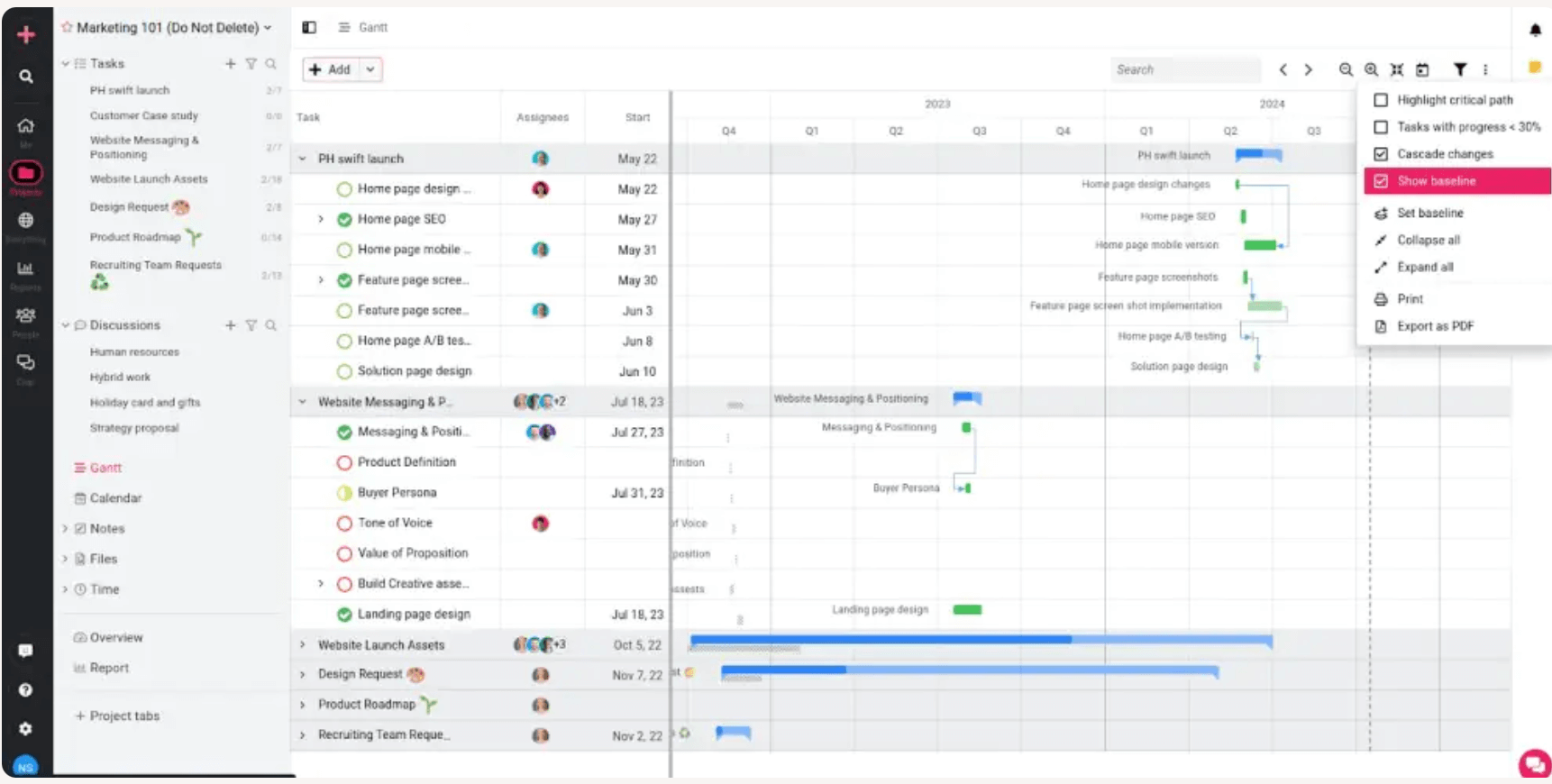
Unlike purely visual Kanban tools, Asana emphasizes structured task relationships, dependencies, timelines, and workload management. It is particularly effective at helping project managers coordinate cross-functional work while maintaining visibility into deadlines and responsibilities.
With the addition of AI features, Asana now supports automated summaries, smart task suggestions, and reporting enhancements.
What Asana Does Well
Structured task management. Tasks can be organized into projects with clear owners, deadlines, dependencies, and milestones.
Timeline and dependency tracking. Asana supports Gantt-style timeline views, helping project managers identify sequencing risks.
Cross-team visibility. Portfolio dashboards allow managers to monitor multiple projects simultaneously.
Automation and AI support. Asana includes rule-based automation and AI-generated summaries to streamline updates.
Enterprise scalability. It supports governance controls, permission levels, and integrations suited to larger organizations.
Optimized Use Case
Asana works best for:
Cross-functional teams managing multiple parallel initiatives
Marketing, operations, and product teams
Organizations needing structured timelines and milestone tracking
Teams that require moderate configuration without heavy technical setup
Its strength lies in structured coordination and dependency management, particularly where accountability and deadline visibility are critical.
Considerations
Asana can feel process-heavy for small teams with simple workflows.
It is less customizable than platforms like ClickUp.
Teams focused purely on visual Kanban may prefer Trello.
Coda AI: Best for Customizable All-in-One Workspaces

Coda is a flexible all-in-one document platform that blends documents, spreadsheets, databases, and lightweight applications into a single collaborative workspace. It is widely used by teams that want to centralize knowledge, processes, and workflows without managing multiple separate tools.
Unlike traditional project management platforms, Coda emphasizes customizable building blocks—tables, buttons, formulas, and integrations—that allow teams to design systems tailored to their exact needs. It functions more like a no-code workspace builder than a rigid task manager.
With the addition of AI features, Coda now supports AI-assisted writing, summarization, content generation, and workflow enhancements directly within documents.
What Coda Does Well
Flexible document-database hybrid. Coda combines rich-text documents with powerful relational tables, allowing teams to structure data without leaving a collaborative doc environment.
Highly customizable workflows. Teams can build tailored systems for project tracking, OKRs, meeting notes, CRMs, roadmaps, or internal tools using formulas and interactive components.
Interactive automation with buttons and packs. Coda supports automation rules, action buttons, and integrations (“Packs”) with tools like Slack, Google Calendar, Jira, and more.
AI-powered assistance. AI can generate summaries, draft content, extract insights from tables, and help automate repetitive documentation tasks.
Centralized team hub. Coda works well as a unified workspace combining documentation, project tracking, decision logs, and operational systems in one place.
Optimized Use Case
Coda works best for:
Teams that want to consolidate multiple tools into a single customizable workspace
Operations, strategy, and product teams building internal systems
Startups and growing organizations that need adaptable processes
Teams comfortable designing their own structure rather than using predefined templates
Its strength lies in flexibility and system-building—particularly when teams want documentation and workflow automation in one environment.
Considerations
Coda requires initial setup and thoughtful design to unlock its full power.
It may feel less structured out-of-the-box compared to traditional project management tools.
Teams that prefer rigid, pre-defined project tracking frameworks may require additional configuration.
Motion AI: Best for Automatic Scheduling and Calendar-Driven Planning
Motion is an AI-powered productivity and project planning platform designed to help project managers organize tasks, meetings, projects, and calendars in a single unified workspace.
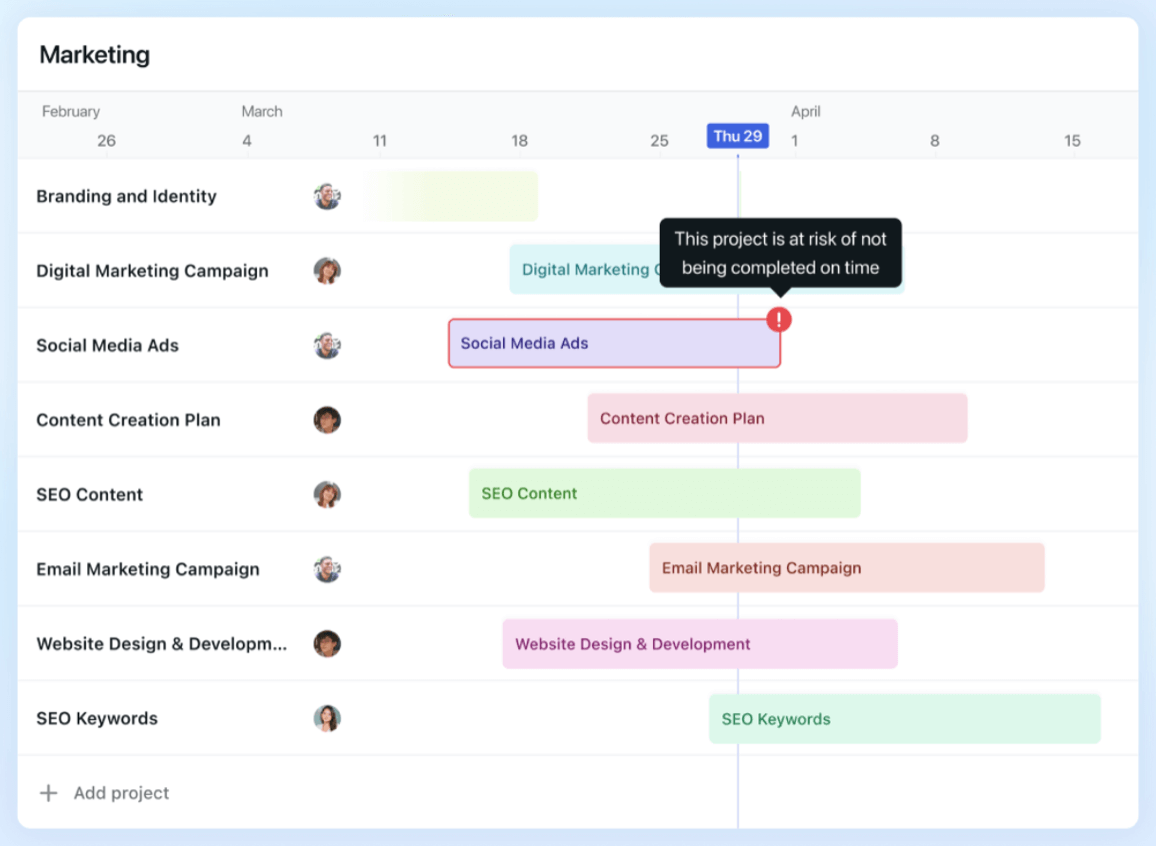
The platform is particularly known for its automated scheduling capabilities. When tasks are entered with deadlines, priorities, and time estimates, Motion’s AI evaluates the calendar and dynamically builds an optimized schedule. As priorities shift or meetings are added, the system automatically adjusts, helping project managers stay focused on the most important work at any given time.
What Motion Does Well
Task and project management. Motion supports task organization using lists and Kanban-style boards. While this functionality is standard among PM tools, Motion’s AI layer adds scheduling intelligence on top of task tracking.
AI-powered planning. Tasks are automatically scheduled based on deadlines, priority levels, and calendar availability. If circumstances change, the plan adjusts in real time — reducing manual rescheduling.
Meeting scheduling and note integration. Motion can schedule meetings based on availability and connect outcomes back to tasks, helping align discussions with execution.
AI-assisted project setup. Based on defined goals and timelines, Motion can generate structured task lists and workflows to accelerate project setup.
Optimized Use Case
Motion is best suited for:
Project managers juggling multiple parallel initiatives
Remote or hybrid teams need tighter coordination.
Individuals who struggle with manual scheduling and calendar overload
Small-to-mid-sized teams looking to automate planning without heavy configuration
Its core strength is time optimization and intelligent scheduling, rather than deep enterprise reporting or complex resource management.
Considerations
Teams that require highly customized workflows may find Motion less flexible than platforms such as ClickUp.
Organizations with strict IT governance policies should confirm integration permissions before adoption.
Taskade AI: Best for Task Breakdown and Workflow Clarity
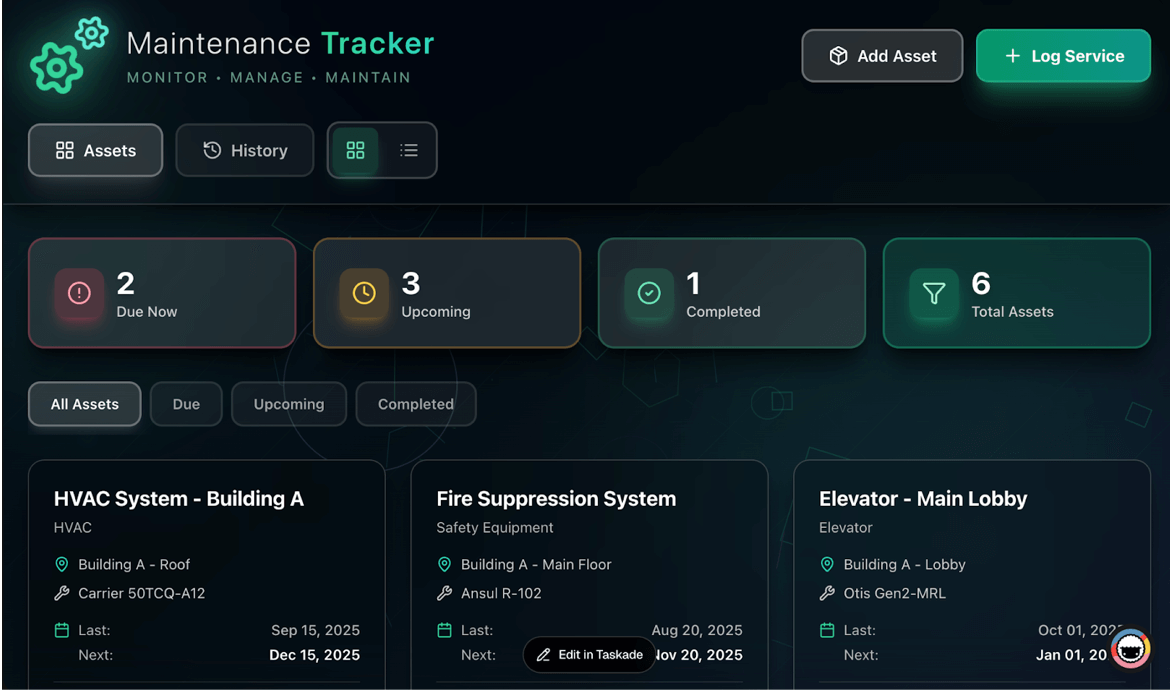
Taskade is a collaborative task management platform focused on structure, clarity, and real-time coordination.
Where Motion emphasizes scheduling optimization, Taskade prioritizes execution workflows—making it particularly useful for project managers who need to keep daily work organized and on track.
The platform uses AI to break down high-level goals into actionable steps, organize tasks into structured hierarchies, and suggest prioritization. Instead of working with long, unstructured task lists, project managers can transform objectives into clear, trackable workflows.
What Taskade Does Well
Real-time collaboration. Team members can see updates and progress instantly, which supports distributed teams.
Built-in structured views. Dashboards, KPI tracking, analytics, real-time reporting, and client portals provide visibility across projects.
Integrations. Taskade connects with tools such as Slack, Gmail, Microsoft Teams, GitHub, GitLab, Google Drive, and OneDrive.
Accessible entry point. A free plan allows teams to test functionality before committing to paid tiers.
Optimized Use Case
Taskade works well for:
Teams that need structured task breakdowns
Managing ongoing operational workflows
Smaller teams looking for collaboration without enterprise complexity
Agile or iterative environments require clear task hierarchies.
Its strength lies in workflow clarity and execution discipline, rather than AI-heavy automation or deep predictive analytics.
Considerations
Teams requiring advanced scheduling intelligence may prefer Motion.
Larger enterprises may require more robust governance controls depending on policy.
Trello + Jira: Best for Simple Kanban + Scale to Agile Delivery
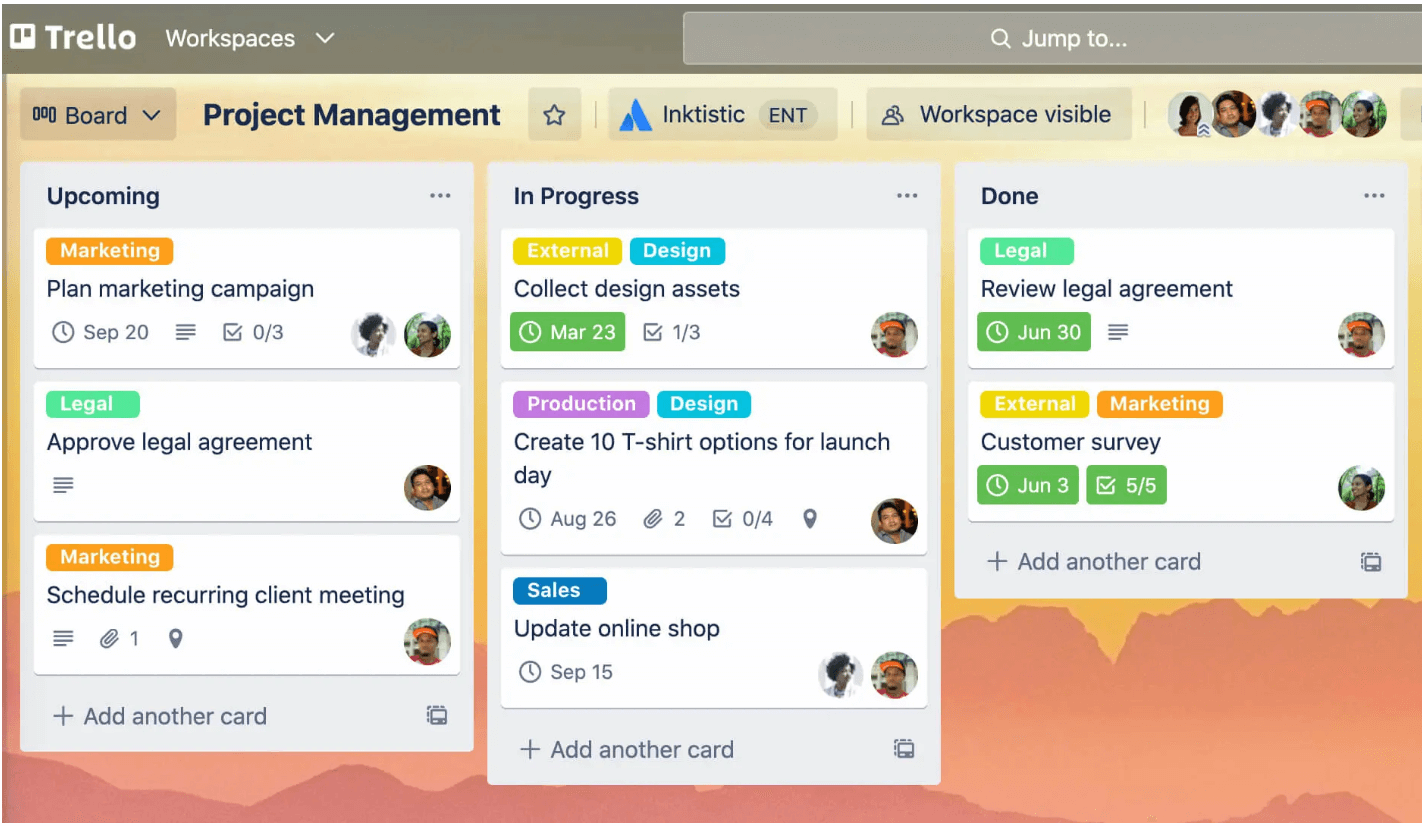
Trello is a visual project management tool built around the Kanban methodology. Owned by Atlassian, it is widely used by teams that prefer a simple, intuitive way to organize tasks and workflows.
At its core, Trello operates through boards, lists, and cards. Tasks move across columns representing different stages of work — such as To Do, In Progress, and Done — providing instant visibility into project status.
While Trello began as a lightweight task management tool, it has evolved. Through automation features (such as Butler) and Atlassian Intelligence, Trello now includes AI-assisted capabilities for summarizing content, generating descriptions, and automating repetitive actions.
For teams requiring more advanced tracking — especially in software development — Trello integrates directly with Jira, another Atlassian product designed for Agile planning, backlog management, and issue tracking.
What Trello Does Well
Visual workflow management. Trello’s Kanban-style boards make task status immediately visible and easy to understand, even for non-technical stakeholders.
Ease of adoption. The interface is intuitive, making it particularly suitable for new project managers or teams transitioning from spreadsheets.
Automation through Butler. Trello allows rule-based automation (e.g., moving cards, assigning members, setting due dates), reducing manual updates.
Atlassian ecosystem integration. Trello connects with Jira, Confluence, Slack, Google Drive, and other common collaboration tools.
AI enhancements. Jira and Rovo AI support summarization and content suggestions within cards, improving documentation efficiency.
Optimized Use Case
Trello works best for:
Small to mid-sized teams
Marketing, operations, and cross-functional business teams
Projects with straightforward workflows
Teams prioritizing visual clarity over complex reporting.
When project complexity increases — such as managing detailed backlogs, advanced sprint metrics, or large-scale development pipelines — Jira often becomes the more suitable choice.
Considerations
Trello is intentionally lightweight. It does not provide advanced resource management, detailed reporting, or portfolio-level visibility.
Larger enterprises may outgrow Trello’s structure and transition to Jira for more sophisticated planning needs.
As with other cloud tools, organizations should verify data governance and integration permissions before adoption.
ClickUp AI: Best All-in-One Workspace with Custom Dashboards
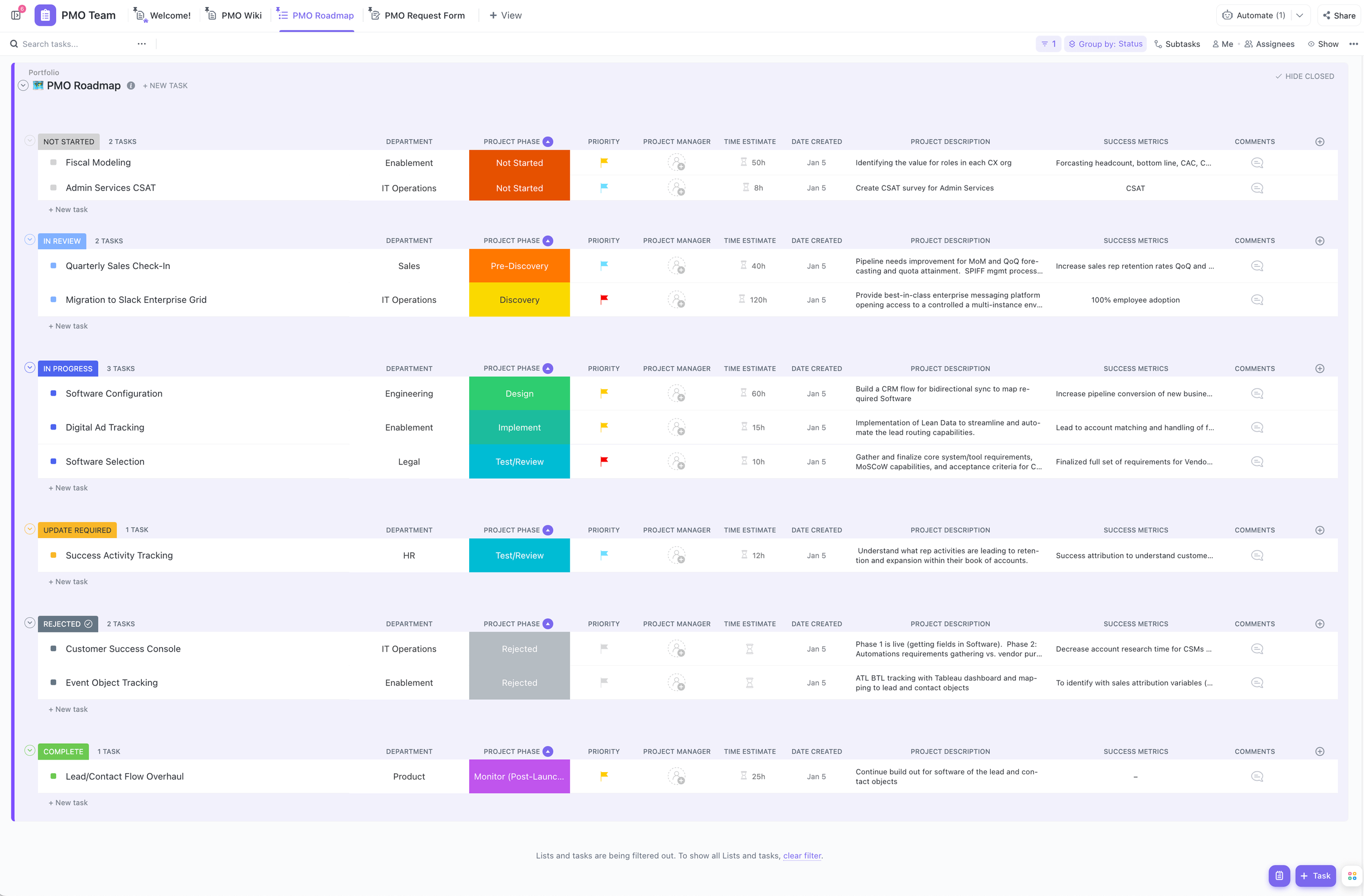
ClickUp is a comprehensive project management platform that centralizes tasks, documentation, communication, reporting, and automation in a single system. It is often positioned as an all-in-one workspace that can adapt to a wide range of project methodologies, including Agile, Waterfall, and hybrid approaches.
What distinguishes ClickUp is its flexibility. Teams can manage work through lists, Kanban boards, Gantt charts, calendars, timelines, dashboards, and workload views. This adaptability allows project managers to tailor the platform to their specific operational model rather than adjusting their processes to fit rigid software constraints.
With the introduction of ClickUp AI, the platform now includes AI-assisted writing, summarization, task creation, and meeting documentation.
What ClickUp Does Well
Flexible project views. Teams can plan and track work using multiple visual formats, supporting different preferences and methodologies.
Integrated collaboration. ClickUp includes built-in chat, document creation, whiteboards, and commenting features, reducing the need for separate tools.
AI-powered assistance. ClickUp AI can summarize updates, draft project documentation, generate task descriptions, and support meeting notes.
Custom dashboards and reporting. Project managers can track KPIs, monitor workload distribution, and maintain visibility across multiple projects.
Extensive integrations. ClickUp integrates with widely used tools such as Slack, Zoom, Microsoft Teams, Google Drive, and more.
Optimized Use Case
ClickUp works best for:
Growing teams are consolidating multiple tools into one platform.
Organizations requiring customizable workflows
Project managers overseeing several concurrent projects
Teams needing structured reporting and dashboard visibility
Its strength lies in breadth and configurability, making it suitable for teams seeking a centralized, scalable solution.
Considerations
ClickUp requires thoughtful setup. Without a clear workflow design, it can feel overwhelming.
Smaller teams with simple processes may not require the full feature set.
Governance and integration permissions should be verified within enterprise environments.
PMI Infinity: Best for PMI-Aligned Guidance, Templates, and Standards
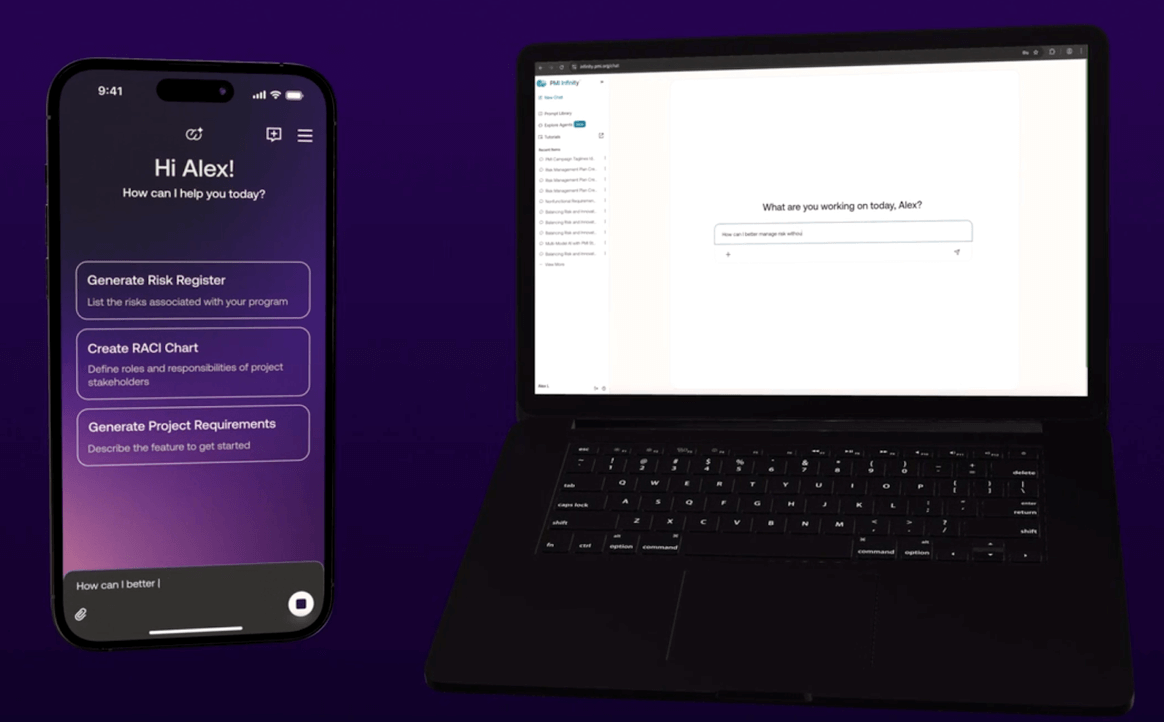
PMI Infinity is an AI-powered assistant developed by the Project Management Institute (PMI). Unlike general AI productivity tools, Infinity is designed specifically for project management professionals and is aligned with PMI standards and terminology.
Because PMI is a globally recognized authority in project management, Infinity carries credibility with professionals preparing for certifications or seeking guidance rooted in established frameworks.
Rather than functioning solely as a chatbot, PMI Infinity is structured to provide contextual project guidance, generate templates, and support planning activities aligned with recognized best practices.
What PMI Infinity Does Well
Standards-aligned guidance. Infinity incorporates PMI methodologies and terminology, making it particularly relevant for PMP and other PMI certification holders.
Prompt library for project scenarios. The platform provides ready-made prompts tailored to common project management challenges.
AI agents for documentation support. Infinity can assist with drafting plans, generating checklists, and reviewing project artifacts.
Mobile accessibility. PMI Infinity is available via mobile applications, enabling managers to work across locations.
Optimized Use Case
PMI Infinity works best for:
Project managers preparing for PMI certifications
Professionals who want guidance aligned with formal PM frameworks
Teams implementing structured governance models
Managers seeking best-practice reinforcement rather than tool automation
Its core strengths are alignment with the PMI methodology and structured guidance, not workflow execution or task management.
Considerations
Infinity does not replace a project management platform such as ClickUp, Trello, or Motion.
It functions as a guidance and support tool rather than an operational delivery system.
Organizations should evaluate subscription requirements and access policies before adoption.
Miro AI: Best for Visual Planning, Workshops, and Discovery
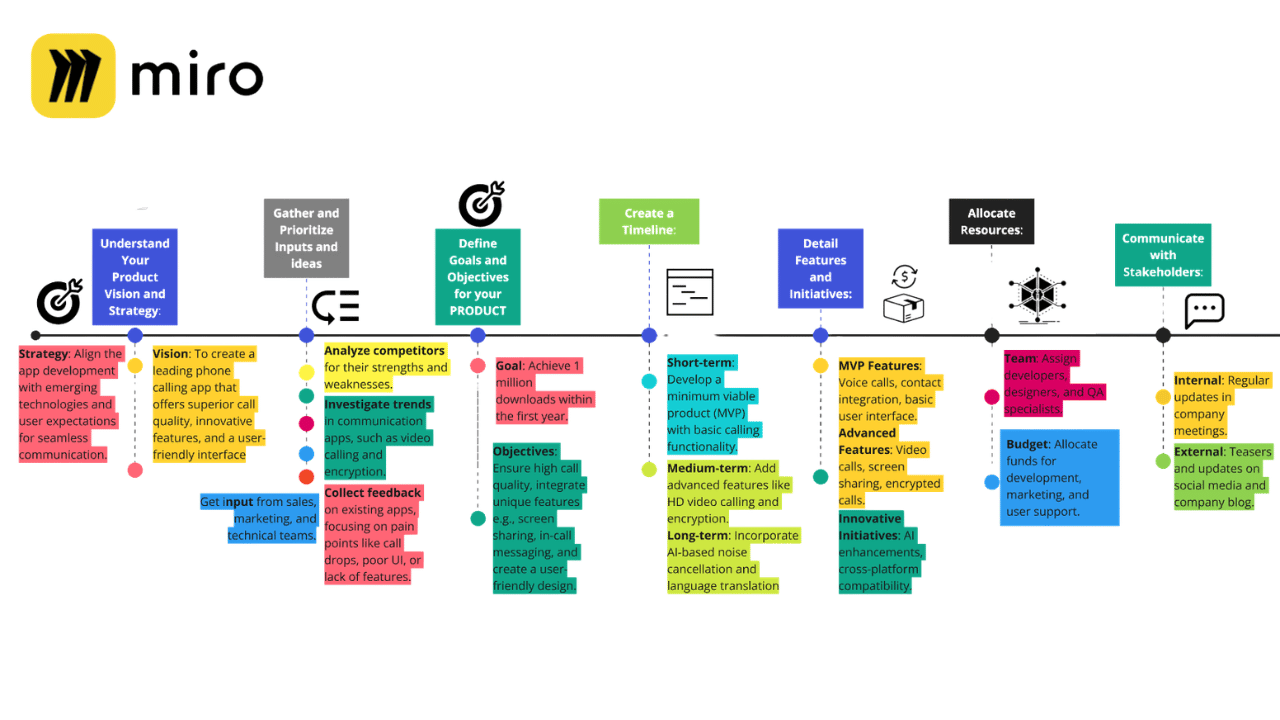
Miro is primarily known as a visual collaboration platform, but some teams use it as a lightweight project planning environment. While it is not a traditional project management system, it can support structured planning when configured thoughtfully.
Unlike task-based platforms, Miro operates through interactive boards where teams can map workflows, timelines, dependencies, and user journeys visually. This makes it particularly effective during early-stage planning, discovery, and alignment phases.
When used intentionally, Miro can function as a visual project hub — especially for teams that prioritize collaborative design and flexible thinking over rigid task structures.
What Miro Does Well
Visual workflow mapping. Teams can create user journeys, roadmaps, sprint plans, and delivery flows in a single interactive space.
Collaborative planning sessions. Distributed teams can plan in real time, reducing friction during workshops and retrospectives.
Template-driven structure. Miro offers templates for Agile ceremonies, Kanban boards, timelines, and product roadmaps.
Integration with execution tools. Miro connects with platforms such as Jira, Asana, and ClickUp, allowing teams to link planning boards to delivery systems.
AI-assisted diagramming. Built-in AI features help generate diagrams and summarize board content.
Optimized Use Case
Miro works best for:
Product and UX teams mapping user journeys
Agile teams conducting sprint planning and retrospectives
Strategy workshops and transformation initiatives
Small-to-mid-sized teams that value visual alignment
Projects in early discovery or design-heavy phases
Its strength lies in visual clarity and collaborative planning, particularly where workflows benefit from being mapped rather than listed.
Configuration Considerations
If Miro is used as a project planning tool rather than just a whiteboard, configuration becomes important:
Clear board structure and naming conventions should be established.
Owners and deadlines must be visible and consistently maintained.
Large boards should be segmented to avoid visual clutter.
Integration with a task management system may be necessary for structured tracking.
Without thoughtful configuration, boards can quickly become difficult to maintain.
Considerations
Miro does not provide advanced task dependency management or resource allocation.
Reporting and portfolio visibility are limited compared to structured PM platforms.
It works best when paired with a dedicated execution tool for long-term tracking.
Which enterprise AI productivity assistant to use in 2026
Your AI Assistant: Best PM Tool for 2026?
If you are a new project manager building your toolkit — or an experienced manager evaluating new options — the challenge is no longer whether AI tools exist. Virtually all project management tools have some level of AI integration. The question really is, what is the more pragmatic option: using fit-for-purpose or enterprise-wide AI?
McKinsey’s latest State of AI in 2025 research shows that while AI adoption is widespread, it is not yet widespread. 88% of respondents said their organizations use AI in at least one business function.
Up to this point, we’ve focused primarily on fit-for-purpose platforms — tools designed to manage structured project workflows such as task tracking, scheduling, reporting, and collaboration.
The next two tools fall into a different category. They are best described as enterprise AI productivity assistants. Rather than replacing project management platforms, they enhance how project managers think, write, analyze, and communicate.
Their true value depends heavily on how they are implemented — particularly whether they are securely integrated into an organization’s systems.
ChatGPT for Project Managers: Best for Writing, Summaries, and Research
ChatGPT is a general-purpose AI assistant developed to support writing, analysis, ideation, and knowledge synthesis across a wide range of domains. While it is not a dedicated project management system, it has become one of the most widely used AI tools by professionals, including project managers.
In project management, ChatGPT primarily serves as a thinking and communication partner rather than a workflow engine.
Its effectiveness depends significantly on how clearly prompts are structured and how much relevant context is provided. When used thoughtfully, it can substantially reduce time spent on documentation, drafting, and research tasks. Careful use of agents and prompts is key to getting the right plan.
What ChatGPT Does Well
Drafting and editing communication. It can generate emails, stakeholder updates, meeting summaries, and status reports, which the project manager can then refine.
Research and knowledge synthesis. ChatGPT can provide structured overviews of methodologies, risk frameworks, or industry trends.
Summarization and clarity. Long reports, meeting notes, or technical explanations can be condensed into clear summaries.
Presentation support. It can outline slide structures and help organize key talking points.
Language translation and refinement. Useful for distributed or international teams.
Optimized Use Case
ChatGPT works best for:
Project managers who spend significant time writing or preparing documentation
Teams needing a quick synthesis of information
Professionals exploring ideas, risks, or scenarios before formalizing decisions
Individuals working across multiple communication channels
Its strength lies in cognitive support and time efficiency, not direct project execution or task tracking.
Considerations
ChatGPT does not inherently access internal company systems unless integrated through approved enterprise solutions.
Outputs must always be reviewed for accuracy, especially in complex or strategic decisions.
Organizations should verify compliance and data privacy policies before using it with sensitive information.
Microsoft 365 Copilot for Project Managers: Best for Fully Integrated Content

Microsoft Copilot is an AI assistant integrated within the Microsoft 365 ecosystem, including tools such as Outlook, Teams, Word, Excel, and PowerPoint. Unlike standalone AI platforms, Copilot is designed to operate directly within existing enterprise workflows.
For organizations already embedded in Microsoft’s environment, Copilot can function as an integrated productivity layer that enhances everyday tasks without requiring a separate interface.
Because it connects to organizational documents, emails, calendars, and meeting transcripts (depending on licensing and configuration), Copilot can generate outputs grounded in internal context.
What Copilot Does Well
Meeting summarization within Teams. Copilot can generate structured summaries, highlight action items, and extract decisions.
Email drafting and thread summarization in Outlook. It can condense long conversations and propose responses.
Document generation in Word and PowerPoint. Copilot can draft structured reports or presentations based on existing files.
Data analysis in Excel. It can assist with interpreting datasets, generating summaries, and identifying trends.
Context-aware assistance. When connected to enterprise data, Copilot can reference internal documents and workflows.
Optimized Use Case
Microsoft Copilot works best for:
Organizations already operating within Microsoft 365
Teams seeking AI support embedded in existing tools
Project managers managing high email volume and frequent virtual meetings.
Enterprises prioritizing secure internal data integration
Its strength lies in deep ecosystem integration and enterprise context awareness, rather than independent task management.
Considerations
Copilot requires enterprise licensing and proper configuration.
The quality of output depends on the structure and organization of internal data.
Governance, permissions, and compliance must be managed carefully within corporate environments.
Should AI Replace Your PM Platform (or Complement It)?

What is the difference between a project management tool and an AI assistant?
Project management tools support structured delivery — tracking tasks, dependencies, timelines, and resources. AI assistants enhance productivity by helping draft, summarize, and analyze information, but do not manage execution workflows directly.
Should AI tools replace existing project management platforms?
No. AI tools should complement existing systems. Fit-for-purpose platforms manage delivery, while AI assistants enhance efficiency and decision support.
Are enterprise licenses important for AI tools?
Yes. Enterprise licensing enables secure integration with internal systems, delivers context-aware outputs, and ensures compliance with organizational governance policies.
Artificial intelligence will not replace project managers. However, project managers who understand how to integrate AI strategically into their workflows will operate more efficiently, communicate more clearly, and make better-informed decisions.
The key is not choosing the most advanced tool, but selecting the one that aligns with your methodology, organizational governance, and team structure.
Fit-for-purpose platforms manage delivery. AI assistants enhance thinking. The strongest project leaders understand the difference.
Choose the Right AI Tool Based on Team Size, Methodology, and Governance
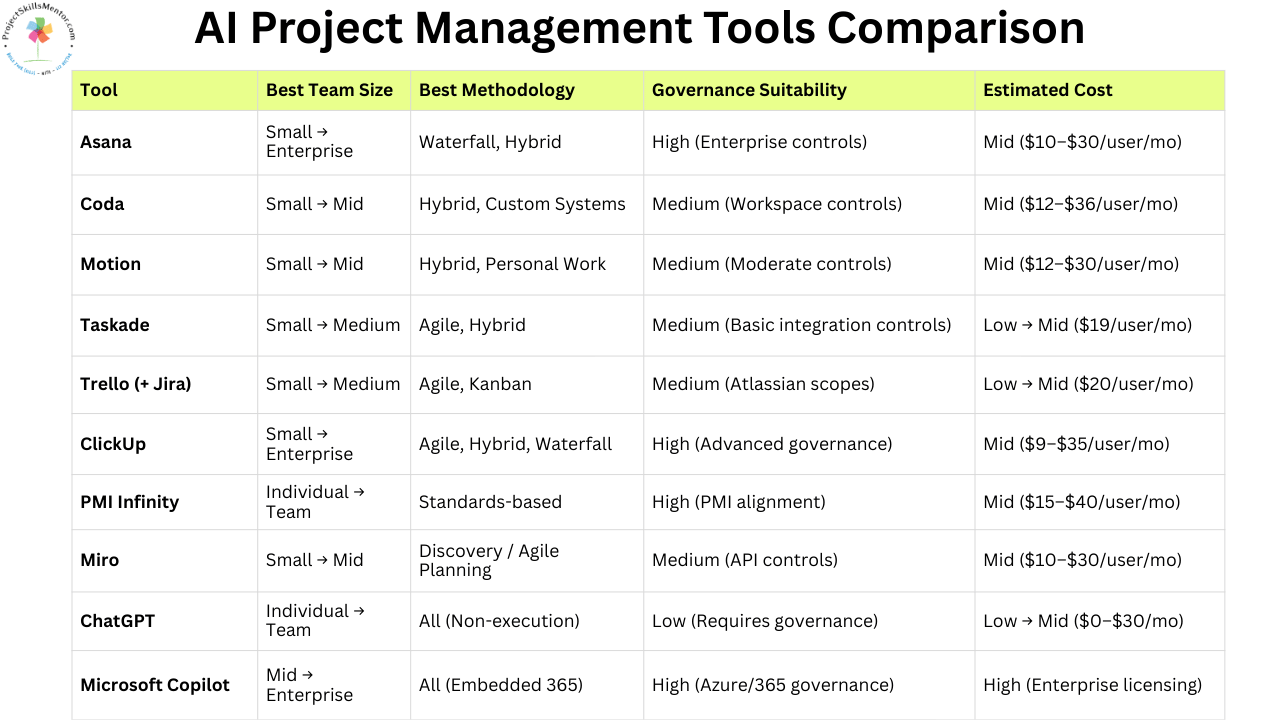
Ultimately, there is no single best tool. Project managers still need to understand the policies, processes, and use cases of their work to make informed decisions.
The graphic above summarizes the 9 tools to help you choose the best fit. Let me know in the comments below which tool you think you will use in 2026.
While these tools can make every project team more productive. However, if managers don’t understand how the information forms the plan, they may get wrong answers without realizing it. If you are looking to understand the key documents required to run a project, you’ll find examples of how to create a Project Charter, Budget, and 7 other documents every project needs in my PM Toolkit.
This article was created in collaboration with Nionila Ivanova. Nionila is the founder of IT Project Management Training for women, where she empowers women leaders navigating the tech industry. With over 15 years of experience leading tech teams and managing projects using both Agile and Waterfall methodologies, she brings deep, practical expertise to her work. She is PMP certified, a Certified Scrum Master, and a tech entrepreneur with an MBA in Computer Information Systems. You can explore her free project management webinar, enroll in her onlinecourses, or join one of her curated, personalized cohort programs. Connect with Nionila on Instagram for insights and guidance on tech project management.