Can One Workspace Really Bring Everything Together?
After more than twenty years leading projects, I’ve found that most projects do not fail due to poor task management. Instead, they struggle when information becomes fragmented.
Project plans are kept in one application, documents in another. Meeting notes are lost in Teams or Outlook, and important decisions in emails often never reach project documentation. As a result, teams spend more time searching for information than using it.
Project managers often juggle Teams, Outlook, SharePoint, Planner, Jira, ChatGPT, OneNote, meeting notes and dozens of browser tabs. I call this "tool chaos." Think of an AI workspace as one place where your documents, conversations, and applications become searchable through natural language.
That isn’t a technology problem. It’s a project management problem.
Recently, I explored Korgi. Let me show you what I learned.
Here’s my independent review of Korgi: AI that orchestrates your project.
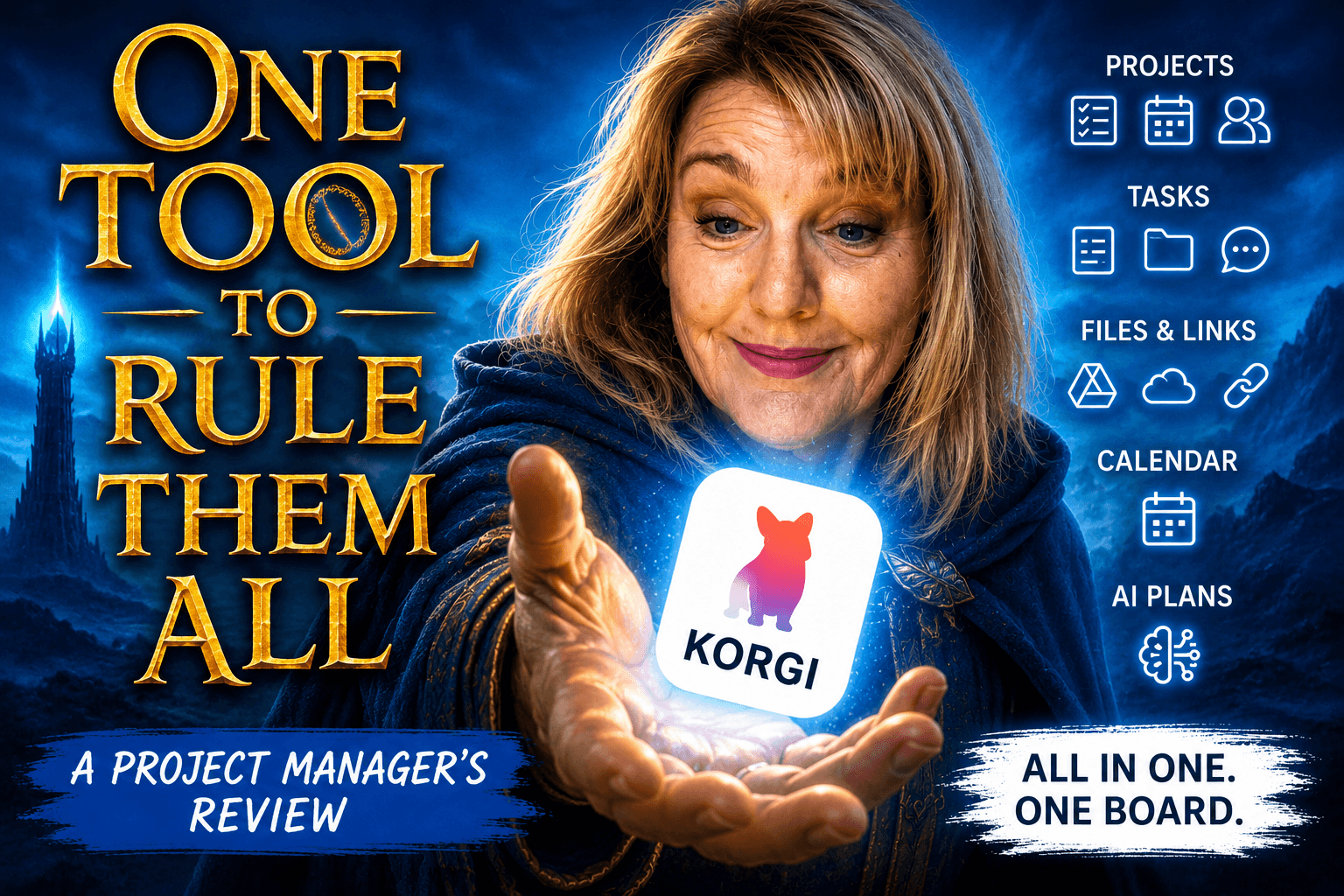
What if there really was one tool to bring it all together?
Years ago, while leading a global banking implementation across thirty-five countries, we developed a tool called “the Kit.” More than a document repository, it followed our delivery methodology and included every process, governance document, approval form, design artifact, and implementation guide needed for consistent program delivery worldwide.
At the time, it was an outstanding solution. Every country used the same framework, which simplified governance and significantly improved project quality.
There was just one problem. We had to build it ourselves.
It took six months to develop, required a dedicated support team for maintenance, and needed annual updates. Despite this, it could not connect all the information. Emails and meeting notes remained separate, and reporting was still manual because documents alone could not convey the full project story.
In retrospect, we were not just delivering a program; we had built an entire system to manage it.
That was the first thing that came to mind when I saw Korgi.
The Korgi Value Proposition
Adding new AI tech to your tool set may seem daunting. But let me help you make a case for change. One of the reasons I like Korgi is that it doesn't try to solve just one project management problem. Most project tools focus on planning, collaboration, or reporting. Korgi takes a broader view by connecting existing information across your Microsoft 365, Google Workspace, and other business applications into a single project workspace. Korgi won't replace specialist scheduling tools like Microsoft Project or Primavera, but that's not what it's designed to do.
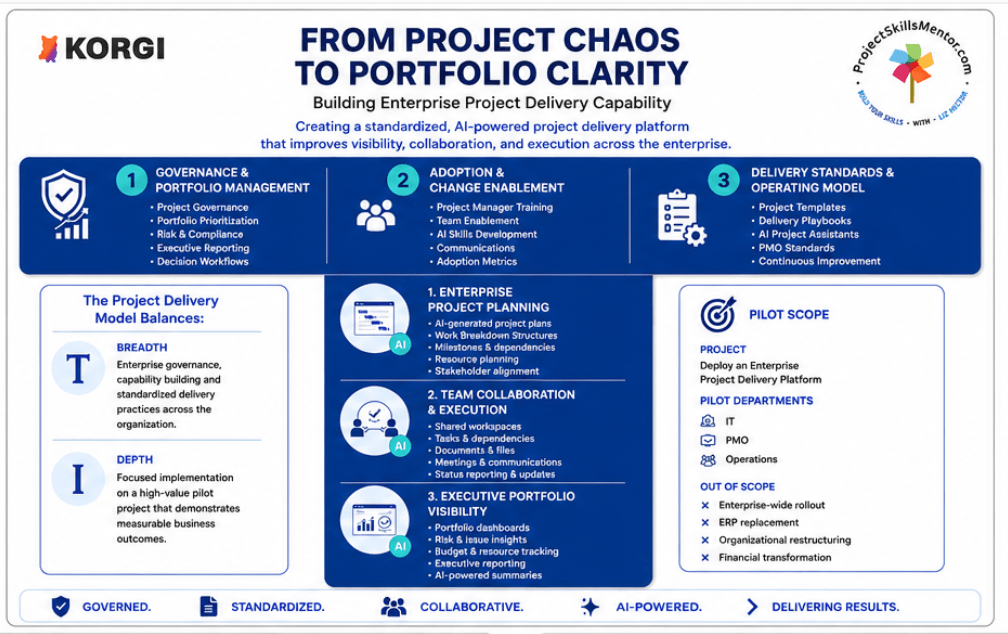
From Project Chaos to Portfolio Clarity introduces what I call the Project Delivery Model. Successful projects need more than a schedule.
Enterprise AI Without the Enterprise Risk
As a project manager who’s worked at Fortune 500 companies for more than 30 years, I look for enterprise capabilities when assessing AI tools. That’s why I was happy to see that Korgi’s approach to AI is designed with enterprise governance in mind. This is important. Korgi doesn’t gatekeep data. Organizations need that confidence when introducing AI into project delivery, particularly in regulated industries, government and large enterprises.
During my time as a Digital Leader at IBM, I worked with organizations trying to simplify increasingly complex technology environments. Almost every CIO had the same objective: reduce the number of systems, retire legacy applications, and simplify the technology landscape. The reality was usually very different. Replacing core platforms was rarely operationally feasible because the cost, risk, and business disruption were simply too great. That's what caught my attention about Korgi. Instead of replacing the technology backbone, it sits above it as an intelligent integration layer, connecting information in a way people can actually use.
From a project manager's perspective, that's where the real value lies. You don't have to convince your team to abandon the tools they already know or migrate years of project documentation into yet another repository. Your project plans, documents, emails, meeting notes, and collaboration tools remain exactly where they are, while Korgi brings them together within the project context. Everything becomes easier so your team can focus on delivery.
How Korgi Improves Delivery Capability
All projects need governance, consistent ways of working, and collaboration across the entire organization. At the same time, they need practical delivery capabilities such as planning, execution, and executive reporting. Korgi brings these together into a single operating model, helping organizations standardize project delivery while giving teams the flexibility to adapt to individual initiatives.
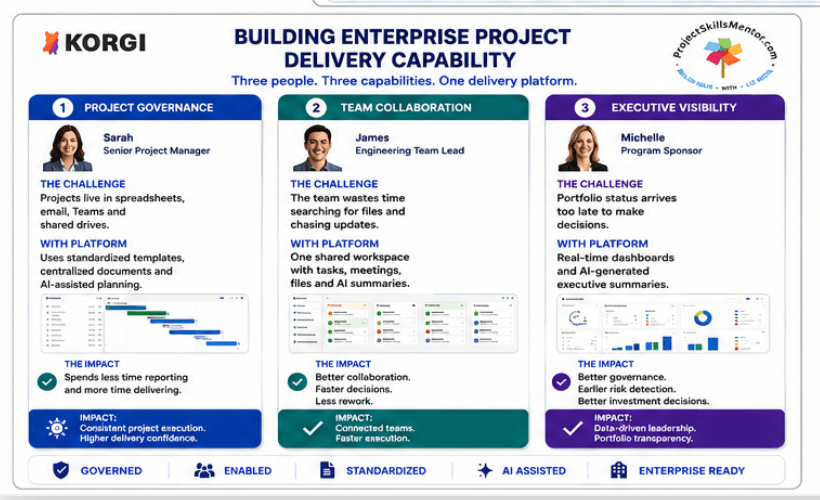
Building Enterprise Project Delivery Capability brings the model to life through the people using it.
Every project has different stakeholders with different needs. Project managers need structure and governance. Team members need a clear place to collaborate and complete work. Sponsors need confidence that they have accurate, up-to-date information when making decisions. Rather than forcing each group into different systems, Korgi creates a shared workspace where everyone works from the same information while seeing what matters most to them.

Enterprise Project Delivery explains what is happening ‘on the shop floor’, by the people doing the work and making decisions about next steps.
This is the technical capability that impressed me the most. Korgi connects information from project plans, product specifications, design documents, emails, calendars, dashboards, contracts and file repositories through integrations with platforms such as Microsoft 365 and Google Workspace. Its intelligence layer organizes, classifies, and links that information before presenting it in a unified project workspace. Instead of copying information between systems, project teams can work with connected data that stays in its original location while remaining available within the project context.
Taken together, these diagrams describe something much bigger than another project management application. They describe a connected project delivery platform.
Here’s a real-life example: Yesterday I had an email from a stakeholder, meeting notes in Teams, a draft RAID log in SharePoint and actions in Planner. Instead of opening four applications separately, I used Korgi to find the information I needed.
For me, that's the real value proposition. It helps systems and teams work together in ways that reflect how projects are actually delivered.
How Korgi Works
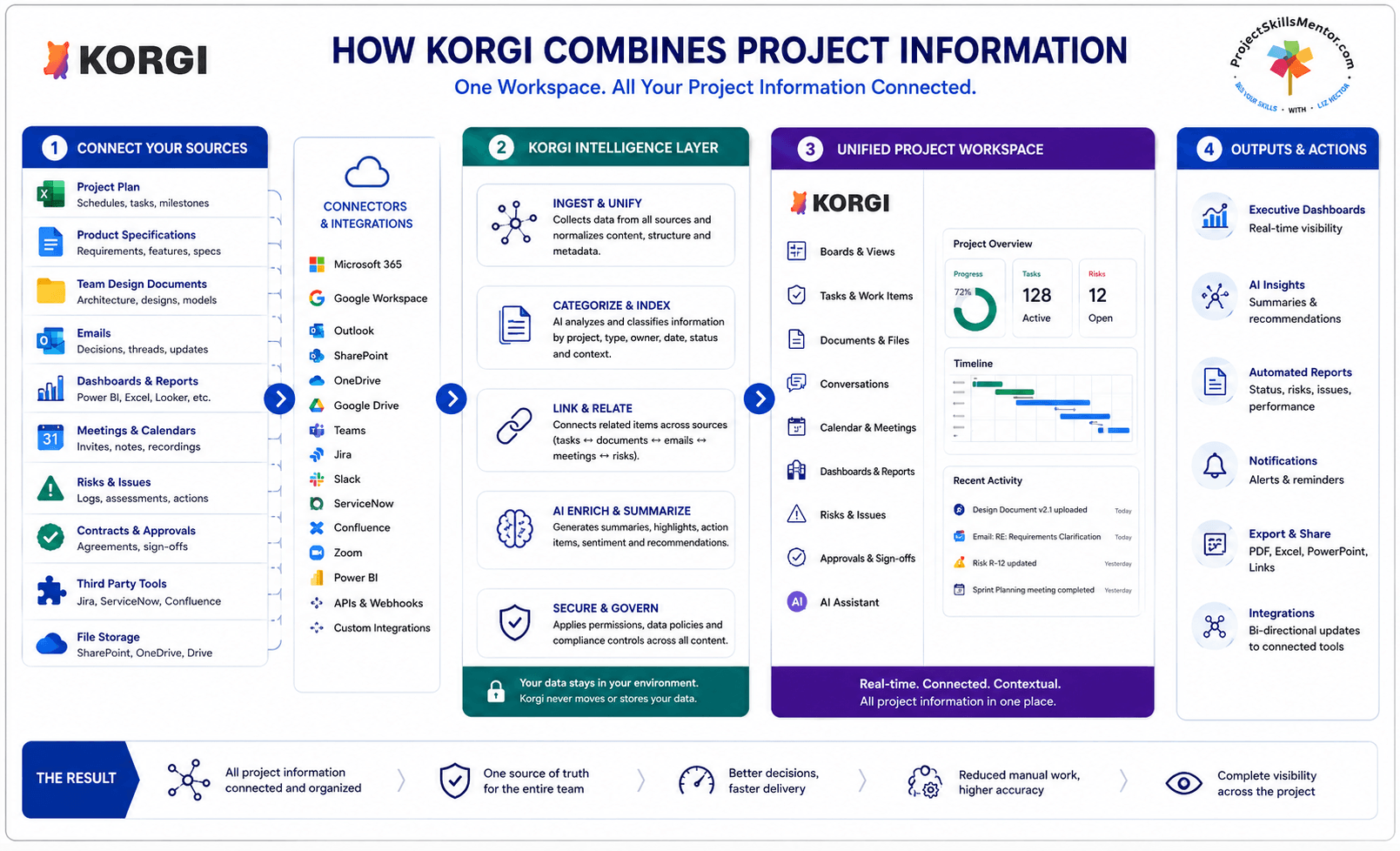
This diagram illustrates how Korgi integrates with an existing technology stack.
Korgi creates a connected project workspace from the outset. Rather than spending months building a framework, you can generate one in minutes, and it evolves alongside your project.
Every project team wants a single, organized workspace. Imagine starting your day with all tasks, project plans, meeting links, documents, conversations, and AI-generated summaries in one place. The project board becomes the team’s single point of reference, eliminating confusion about document versions or action updates. It helps project managers spend less time on administration and more time leading their teams. For team members, it removes the frustration of searching across multiple systems for the information they need. For sponsors, it creates better visibility without waiting for someone to manually prepare another status report.
That is where I think Korgi has real potential. Korgi didn't replace my project management tools—it reduced the amount of time I spent searching across them.
Over the years, I have used Teams, SharePoint, OneDrive, and Slack on many programs. These are excellent collaboration platforms that help teams communicate, share files, and stay connected. And as project managers still need these tools.
Korgi addresses this gap by connecting these services within a workspace focused on project delivery. It complements the Microsoft ecosystem, enabling organizations to use familiar tools while gaining clearer visibility into projects.
Many organizations still struggle to consolidate all supporting materials around tasks. Documents, meeting outcomes, emails, decisions, and knowledge often remain scattered. Korgi addresses this by making the project board the central hub for both work and supporting information into something manageable. Like the “one ring” of Tolkien lore, Korgi binds together all of the input, throughput and output of your project.
How To Start Using Korgi
Describe your project in plain English, and Korgi will generate an initial project board. You can then tailor it to your methodology, whether Agile, PRINCE2, PMI, or a unique approach.
Each card can hold documents, notes, conversations, links, checklists, and tasks. As the project progresses, the board evolves accordingly. Decisions are recorded where the work occurs, rather than being buried in lengthy email chains in your own secure environment, while Korgi provides the workspace that brings everything together. Calendars, meetings, files, and collaboration tools all become part of a single project experience rather than separate destinations.
When you log in, the first thing you will see is tutorial help. I suggest you use it since with every new tool, there is a learning curve. As a user, one of the best features is how the AI functions as a team member rather than a separate chatbot. It works like a digital PM, generating project structures, organizing information, summarizing discussions, and answering questions in the context of your project. Instead of producing generic content, it uses information from your board to make the results more relevant.
For me, that’s where the real value lies.
Artificial intelligence should do more than generate task lists. It should reduce administrative burdens, allowing project managers to focus on leadership. This enables teams to spend less time searching and reporting, and more time solving problems and engaging stakeholders.
After exploring Korgi, I found myself considering the future of project delivery rather than just the software itself.
Effective project management is not about perfect methodologies or advanced dashboards. It is about making work easier for those delivering the project.
Korgi feels like a platform designed with that principle in mind.
Korgi does not require organizations to abandon their existing Microsoft or Google tools. Instead, it connects them to a workspace that aligns with real project workflows, making projects easier to manage and follow.
For someone who once spent six months helping build “the Kit” to solve this problem, that’s a strong compliment.
If a platform like Korgi had been available then, we could have focused on execution and customer engagement, both of which are higher-value goals for any project team.
If your biggest project challenge is scattered information rather than poor planning, Korgi is worth exploring. I recommend starting with a small pilot project and seeing how it fits into your existing delivery approach before rolling it out more broadly.
What about the people side of project management? Systems like Korgi can help, but when managers and teams need to understand the human dynamics of remote teams, you may want to read this article next.