

AI First User Journeys: Designing Smarter Delivery with AI Tools
Project teams have long relied on user journey mapping to understand customer outcomes, but AI is transforming the process. Making it faster, more accurate, and better aligned to real-world needs.

How AI Enhances User Journey Mapping
Faster Insight Generation
Improved Accuracy and Personalization
Continuous Optimization
AI is changing how teams design and deliver user journeys. It is now about systems that anticipate needs, reduce effort, and operate in real time, not just documenting processes.
For project managers, UX, and delivery teams, the shift is practical. The key question is how to use the right AI tools to improve outcomes without adding complexity.
This guide explains how to design AI-first user journeys using fit-for-purpose tools like Skywork.ai and how these tools support delivery.
Why the Right Tools Matter in AI First Journeys
Many teams adopt AI tools without clear objectives, resulting in fragmented workflows and limited impact.
Why should teams use the right AI tool for the right use case? Data shows that AI use in customer experience can cut service costs by up to 30% and improve satisfaction. When fit-for-purpose tools are used and the team understands their projects specific role in the user journey outcome, AI tools can deliver faster, cheaper, and better results. But a key warning: teams need to make sure that AI supports delivery rather than causing distractions. That requires understand which tool is right for you, since quality of output is better with fit for purpose tools, you’ll need to understand your goals. More on that below.
AI has the potential to transform customer journeys by predicting intent and automating interactions at scale - McKinsey Report
Start with a Clear Brief
Before adding any, define the journey first, then introduce tools. Brief includes:
• Target user and context
• Problem being solved
• Customer success criteria
• Business outcomes
• Channels involved
• Constraints such as compliance or budget
AI accelerates execution only when the direction is clear. Otherwise, tools may automate the wrong activities. For project teams, AI delivers value when used in targeted ways, not through broad experimentation.
Ground the Journey in Real Data
AI-first journeys should be based on evidence. Use data sources such as analytics, service logs, and customer feedback to identify:
• Pain points
• Drop off moments
• Trust issues
• Operational bottlenecks
In e-commerce, uncertainty about delivery timing often leads to process abandonment.

Organizations that focus on customer journey analytics outperform competitors by delivering more relevant and timely experiences - Gartner Report
Cusomize Personas with AI

Persona Maps may depend on the kind of journey you are creating.
Personas should inform decision-making, not serve as mere presentation material. A useful persona includes:
• Trigger moment
• Goal
• Risks or concerns
• Key decision points
• Preferred interaction channels
In AI-first journeys, personas are customized to provide clarity. They will show where automation is suitable and where human interaction is necessary.
AI Options: Are They All Equal

To showcase how AI tools differ, I started with the same prompt.
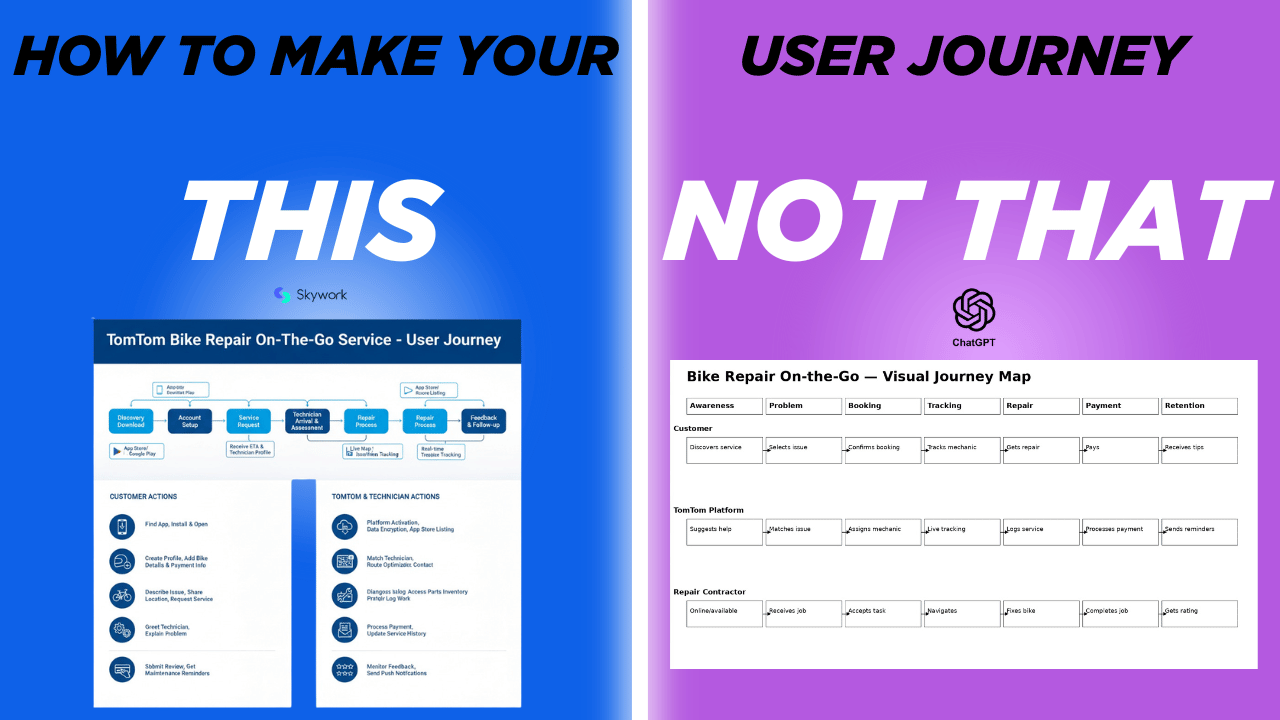
I worked with two tools, the paid versions of ChatGPT and Skywork.ai, to generate a user journey map for TomTom’s bike repair on-the-go service. Reviewing both outputs side by side makes the differences in approach immediately apparent. ChatGPT, as a general-purpose AI, produced a structured but relatively basic journey—clear, logical, and text-driven, but lacking the visual hierarchy, design language, and storytelling expected in a professional UX deliverable. In contrast, Skywork.ai generated a more polished and presentation-ready artifact, with stronger visual flow, iconography, and a clearer sense of how the journey would be consumed by stakeholders.
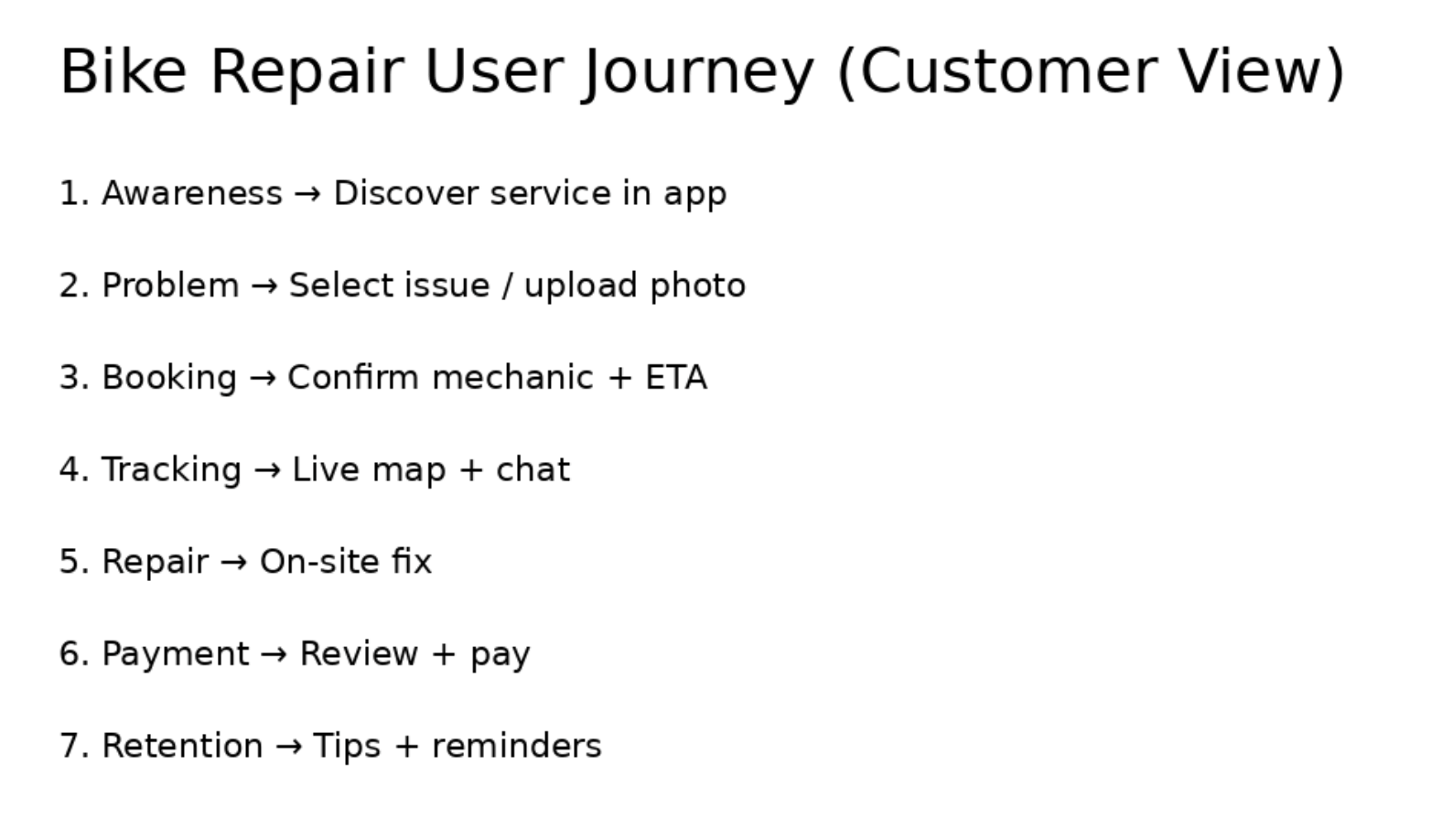
ChatGPT answered the question, but didn’t provide the visuals or details to support the case.
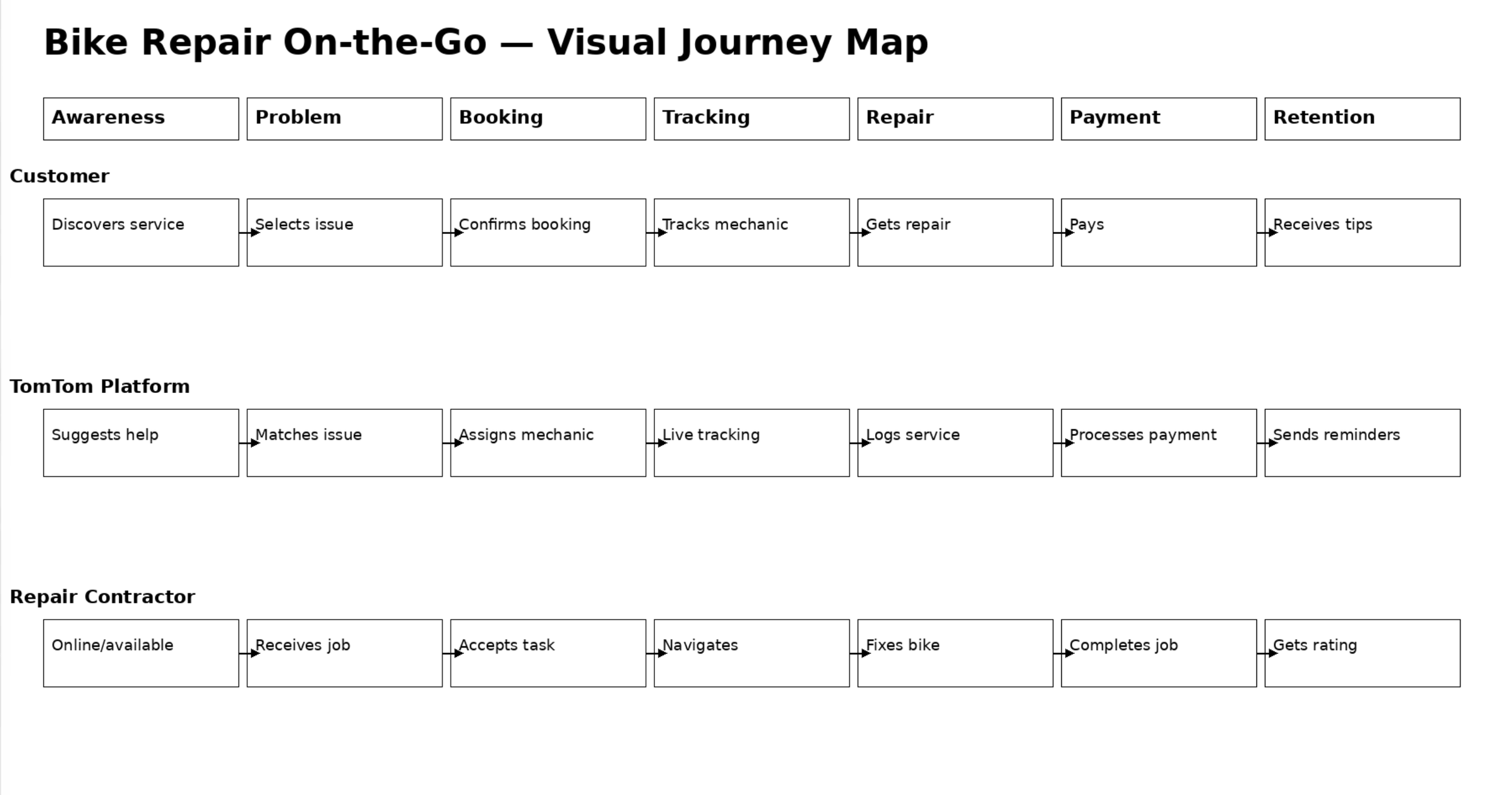
With ChatGPT you can get a fast and simple process flow, which can meet some use cases
This comparison highlights the value of using a fit-for-purpose AI tool. Tools like Skywork.ai are specifically designed for structured outputs such as journey maps, service blueprints, and visual frameworks. As a result, they embed design conventions—such as stage progression, visual grouping, and frontstage/backstage separation—directly into the output. This reduces the need for post-processing and makes the deliverable immediately usable in workshops or executive presentations. General tools like ChatGPT remain useful for ideation, content structuring, and rapid iteration, but they typically require an additional design step to achieve the same level of quality.
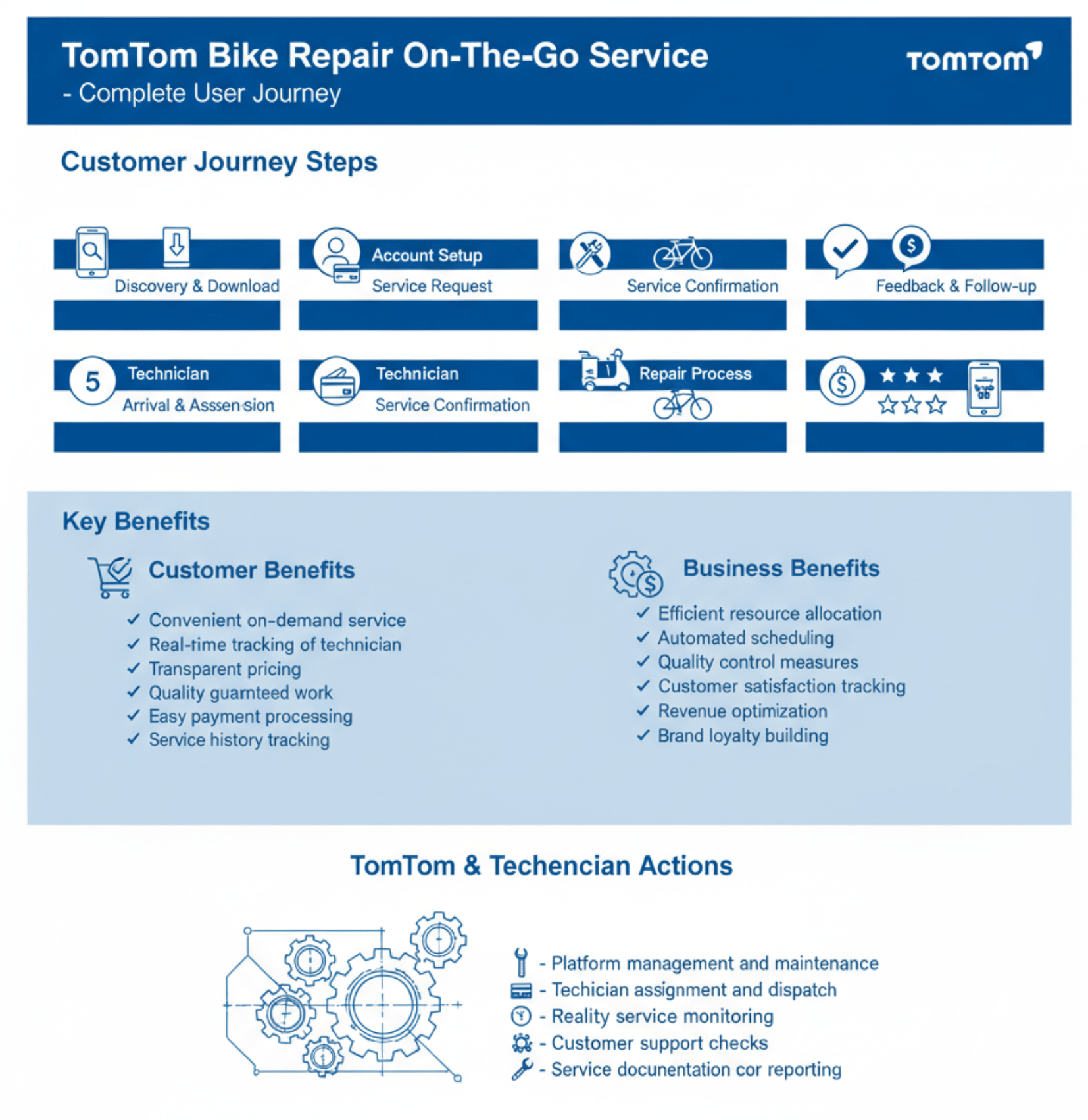
Skyworks.ai understood the asignement more deeply. Providing true insights into function and the benefits.
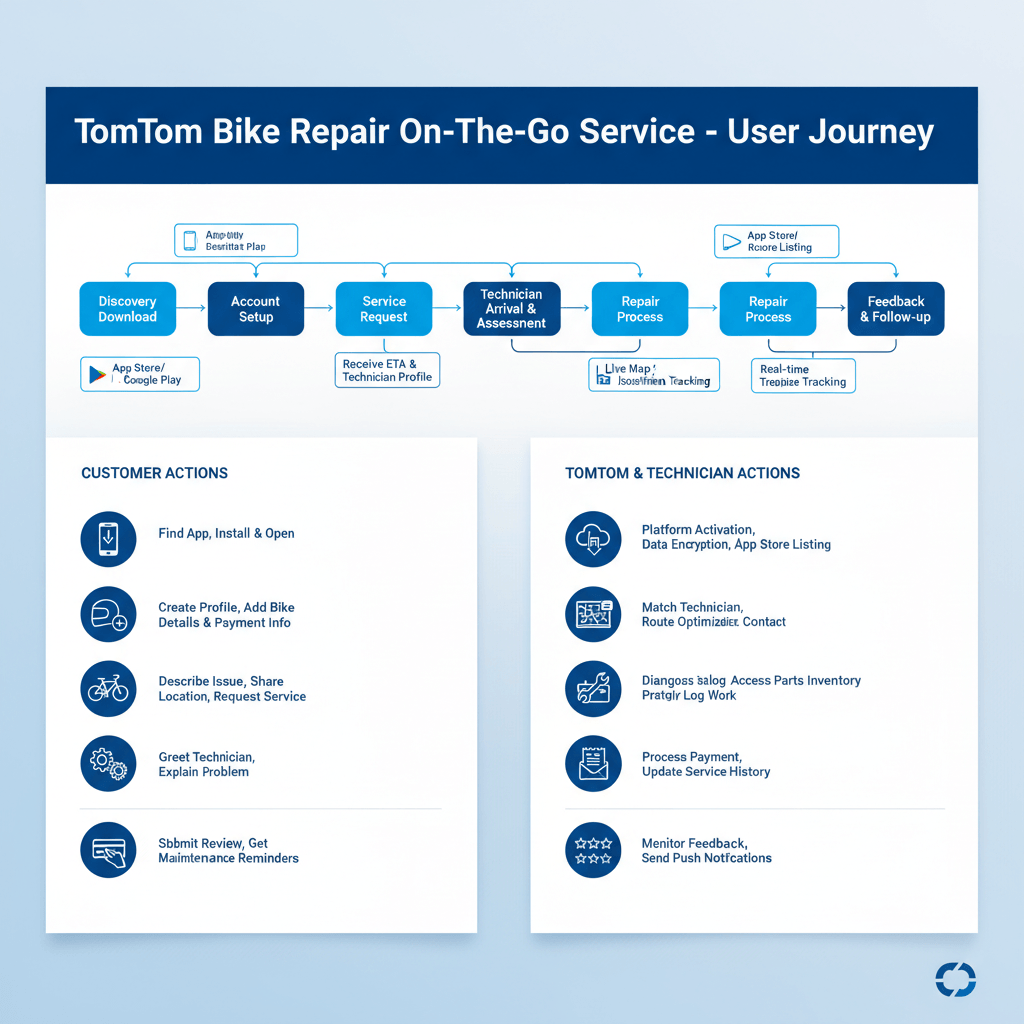
Skyworks.ai is an example of a fit for purpose AI tool built to document processes visually
Skyworks.ai is not the only tool that can There are several other tools in this “fit-for-purpose” category that can produce similar results. Platforms such as Miro, FigJam, UXPressia, and Smaply provide structured templates and visual systems tailored to service design. Learn more AI tools for project teams here. Additionally, newer AI-assisted design tools like Canva and Visily are beginning to bridge the gap between content generation and visual output. The key takeaway is that combining a general AI tool for thinking with a specialized visualization tool produces the most effective results.
Add the AI Layer: Where It Matters

How to Apply AI Right
Use AI where it reduces effort or enhances decision-making.
Key opportunities include:
• Predicting customer needs before they act
• Automating routine decisions
• Providing real-time updates
• Supporting service teams with insights
Tools like Skywork.ai enable teams to model journeys, simulate outcomes, and design AI-driven workflows without significant technical overhead.
If your team is working on a process.
Think in terms of Signal → Prediction → Action.
Transforming user insights into timely, effective experiences.
Which AI Tool is Best: Tool vs Use Case
Different tools play distinct roles in AI-first journey design.
Journey Design and Simulation Tools
Tools like Skywork.ai help teams:
• Visualize journeys dynamically
• Simulate customer behavior
• Test AI interventions before implementation
These tools are most valuable during early design and validation.
Data and Insight Tools
Platforms such as Google Analytics or customer data platforms help:
• Identify patterns and signals
• Track user behavior
• Validate assumptions. These tools provide the foundation for AI predictions.s.
Automation and Orchestration Tools
AI workflow tools and automation platforms enable:
• Trigger-based actions
• Decision automation
• Integration across systems
These tools are essential for moving from design to execution.
AI Agent and Conversational Tools
AI agents can be used to:
• Guide users through journeys
• Support internal teams with decision-making
• Explain processes and policies
They make user journeys interactive rather than static.
Tools in Practice: End-to-End Journey
To apply AI effectively, start with a clearly defined end-to-end user journey. Using a familiar example will help structure thinking and ensures consistency across teams. Typical stages include:
Discovery and Onboarding
Service Request
Confirmation and Scheduling
Service Delivery
Follow-up and Feedback
For each stage, define the core elements that drive value: the customer goal, key friction points, available data signals, AI predictions, and resulting AI-driven actions. This creates a consistent framework that connects user needs directly to operational decisions.
Once the journey is defined, integrate AI tools into the workflow in a structured way. A practical checklist approach helps maintain clarity and momentum: define the journey and desired outcomes, validate pain points using data, design and simulate the journey using a tool such as Skywork.ai, identify where AI adds value, implement automation through workflow tools, test with real scenarios, and measure and refine continuously. This ensures each step builds on the last, keeping the focus on delivering meaningful improvements rather than introducing unnecessary complexity.
Validate and Measure: Focus on Outcomes
Validation should be treated as a core phase of delivery, not a final checkpoint. Before scaling, the journey must be tested under real operational conditions to ensure it performs as intended. This means going beyond controlled environments and assessing how the journey behaves with live data, real users, and unpredictable scenarios. Teams should systematically verify data accuracy, system reliability, transparency of AI-driven decisions, and the ability to handle exceptions without breaking the experience. A well-validated journey is not only functional but resilient, consistent, and ready to scale.
Using your defined journey structure helps to anchor measurement to each stage. Rather than evaluating the journey as a whole, focus on outcomes at every step: from request through to completion and follow-up. This ensures that improvements are targeted and measurable. Choose KPI’s that work for your solution.
Key Performance metrics provide a balanced view across efficiency, cost, and user experience, allowing teams to identify where AI is delivering value and where further refinement is needed. Examples of these metrics are:
• Time to resolution
• Cost to serve
• Customer effort score
• Repeat usage
• Escalation rates
This focus on measurable outcomes is critical. According to PWC, 73 percent of customers say experience is a key factor in purchasing decisions. This reinforces the need to design journeys that are not only intuitive but also quantifiably effective. By embedding measurement into the journey from the outset, teams can continuously optimize performance, demonstrate impact, and ensure that AI investments translate into real business and customer value.
Before You Start on your AI User Journey
Don’t let your AI journey get away from you. So avoid the common traps. Before you start, think about your specific situation and create a plan for risk mitigation. Use the example below to help you get started.
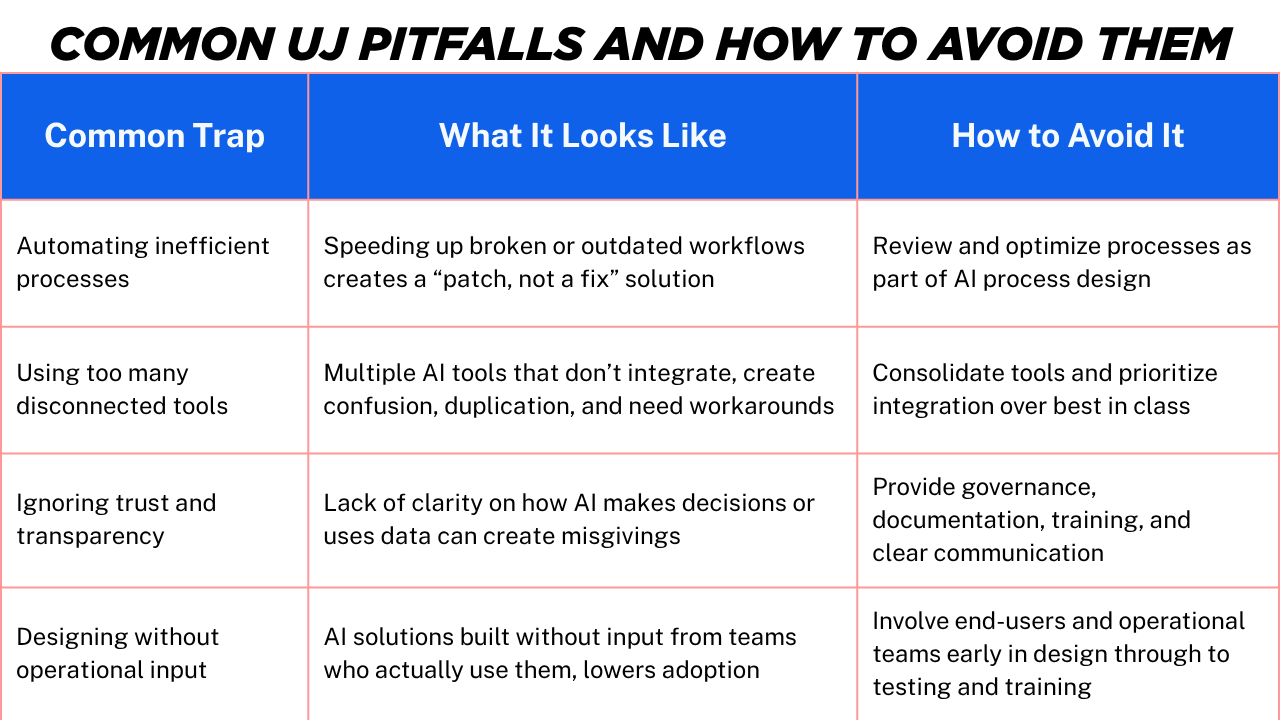
Your AI User Journey is only as good as the business practices around how you involve the people, processes and technology.
Effective AI journeys are interative and integrated rather than simply layered.
AI-first user journeys are not about adding technology, but about designing systems that operate predictively and reliably. Project teams use fit-for-purpose tools to gain clarity, reduce complexity, and improve delivery outcomes.
The goal is not advanced journeys, but easier experiences for customers and greater efficiency for the business.
If you want to know more about the impact of AI on User Journeys read this article on CES 2026.
Let me know in the comments below. Are using use AI to create your user journey?