For agency leaders, consultants, and client-facing operations managers, projects often appear busy while results slowly drift off course. Teams are juggling deadlines, client requests, competing priorities, and unexpected issues, yet projects still experience delays, rework, and frustrated stakeholders.
The problem usually isn't a lack of effort.
It's that small project management gaps accumulate faster than teams can respond.
A missing design decision becomes rework. A delayed approval leaves specialists waiting. Poorly defined deliverables create different expectations between the client and the delivery team. Before long, workflow bottlenecks appear, schedules slip, and client confidence begins to decline, even though everyone is working harder than ever.
Project optimization isn't about adding more meetings or more paperwork.
It's about building repeatable systems that help your team consistently deliver successful outcomes while creating a better experience for your clients.
Why? Because success is no longer measured solely by the traditional "iron triangle" of scope, schedule, and cost. According to PMI's Built to Thrive report, projects that actively measure customer satisfaction are 1.6 times more likely to achieve high project performance and are 81% more likely than other projects to deliver strong customer value.

Projects build solutions.
User engagement builds success.
Here’s how to do both well.
Six Ways to Improve Project Delivery
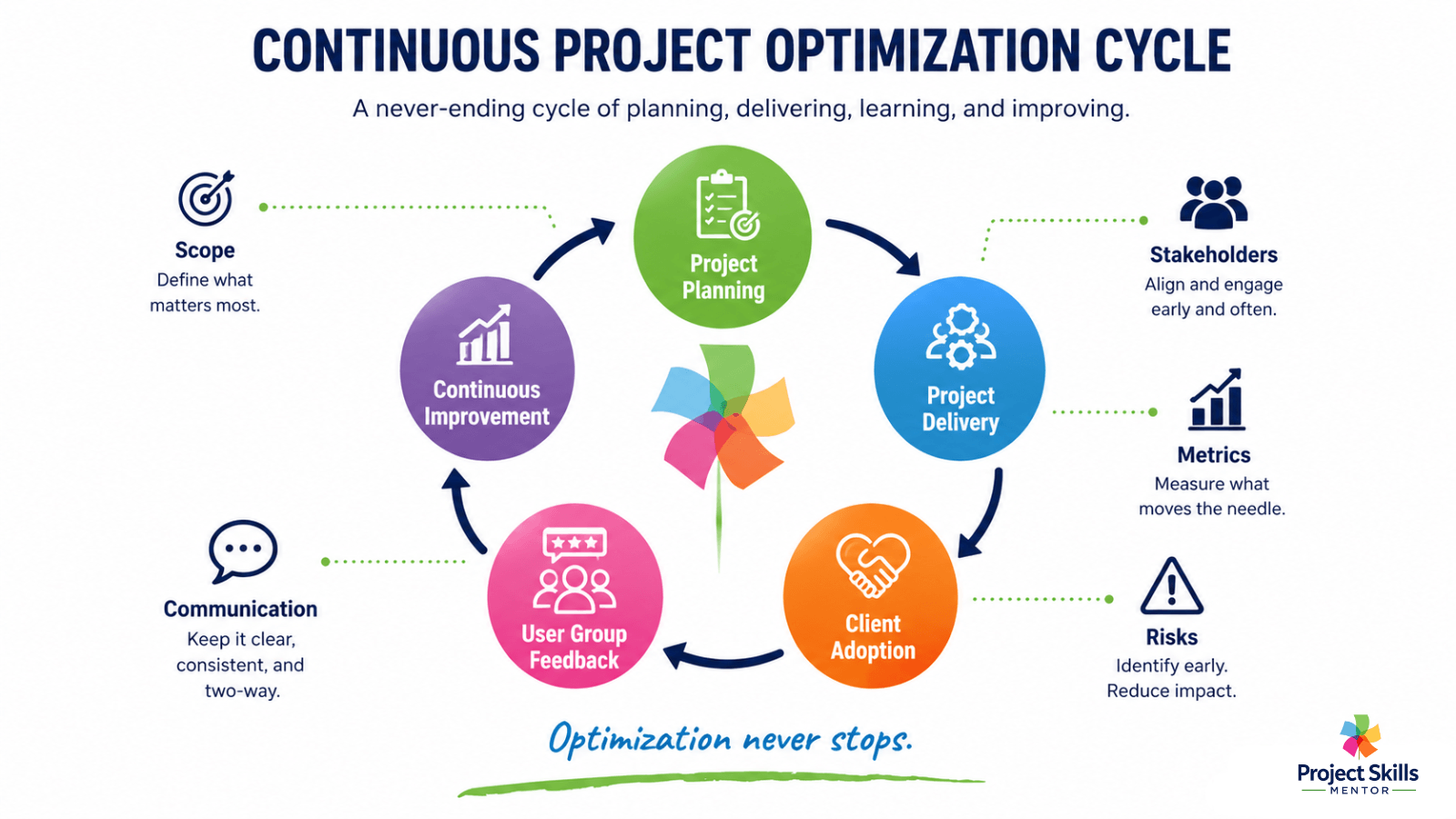
Define project scope, objectives, roles, deliverables, acceptance criteria, and milestones before work begins.
Create predictable communication rhythms for both your team and your clients.
Prioritize work based on business value and delivery risk.
Standardize repeatable workflows and automate routine administration where possible.
Identify and manage project risks before they become delivery issues.
Continue optimizing after go-live through User Groups and continuous improvement.
Speed Up Client Approvals Without Creating Bottlenecks
One of the easiest ways to lose project momentum is to wait for decisions.
Contracts, design approvals, change requests, milestone sign-offs, and client feedback can all stop work if each approval process differs.
Instead, create one consistent approval workflow.
Everyone should understand:
Who approves the work?
What are they approving?
When is approval required?
What happens after approval?
Digital approval tools and secure electronic signatures help remove unnecessary administration while creating a reliable audit trail. More importantly, they remove uncertainty. Everyone knows where a document is, who owns the next step, and when work can continue.
Project Skills Mentor Tip
Clients rarely complain about structured governance. They complain when they don't know what's happening. What’s the best way to match Governance to your project? Find out here.
Understanding What You're Really Optimizing
Many organizations think project optimization ends when the final deliverable is accepted.
Experienced project managers know that's only the beginning.
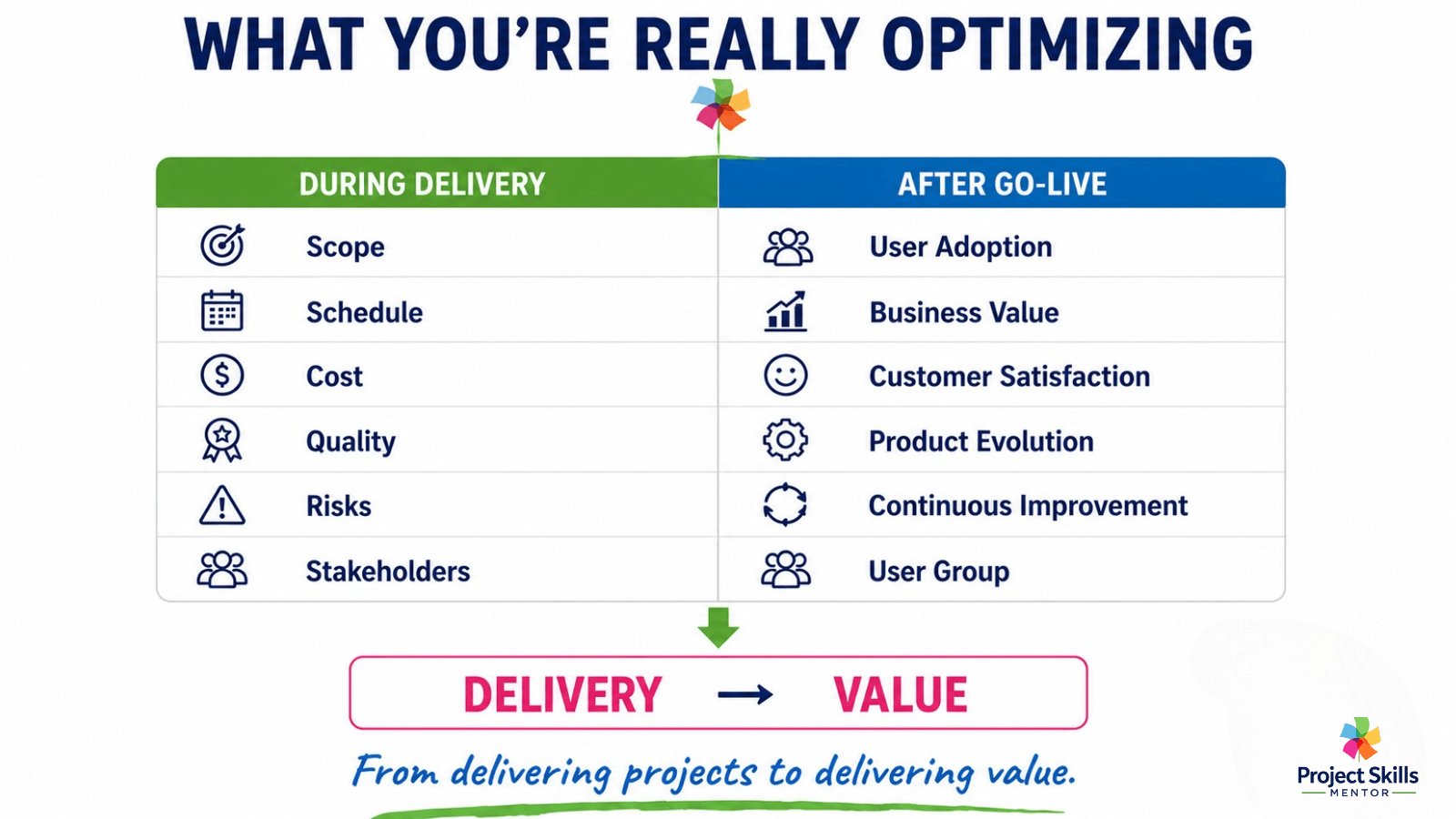
The real objective isn't simply delivering a project on time and within budget.
It ensures the solution continues to deliver value as business needs evolve.
During project delivery, you're optimizing:
Scope
Schedule
Cost
Quality
Stakeholder engagement
Risk management
After implementation, your focus changes.
Now you're optimizing:
User adoption
Business outcomes
Customer satisfaction
Operational efficiency
Product enhancements
Continuous improvement
This is where many organizations lose momentum.
Once the project closes, ownership becomes fragmented. Small enhancement requests arrive from different departments, priorities begin to conflict, and the original solution slowly drifts away from the business objectives it was designed to support.
One of the most effective ways to prevent this is by establishing a User Group.
A User Group creates an ongoing partnership between business users, operational teams, and project leaders. Instead of reacting to problems, the group reviews how the solution is performing, evaluates enhancement requests, shares lessons learned, and ensures that future changes continue to support the overall design.
Optimization becomes an ongoing business capability rather than another project.
User Groups help maintain solution integrity while supporting long-term business improvement.
Project Skills Mentor Tip
Projects deliver outputs. Find out how User Groups help organizations deliver lasting outcomes.
Great Projects Start with Great Workshops

Many project issues can be traced back to poor project initiation rather than poor execution.
If stakeholders leave a workshop with different expectations, those misunderstandings become expensive during delivery.
A well-planned workshop helps define:
Business objectives
Project scope
Stakeholder expectations
Priorities
Success measures
Decision ownership
The workshop itself isn't the objective.
Shared understanding is.
I've found that the best workshops don't simply gather requirements—they build commitment. When stakeholders help shape the solution, they're far more likely to support it during implementation.
Equally important is what happens after the workshop. Clear documentation, agreed actions, and regular communication maintain alignment as the project progresses.
Project Skills Mentor Tip
Use my How to Run a Workshop guide for practical techniques for planning workshops that drive decisions, not long lists of actions.
Build a Repeatable Workflow That Teams Can Trust
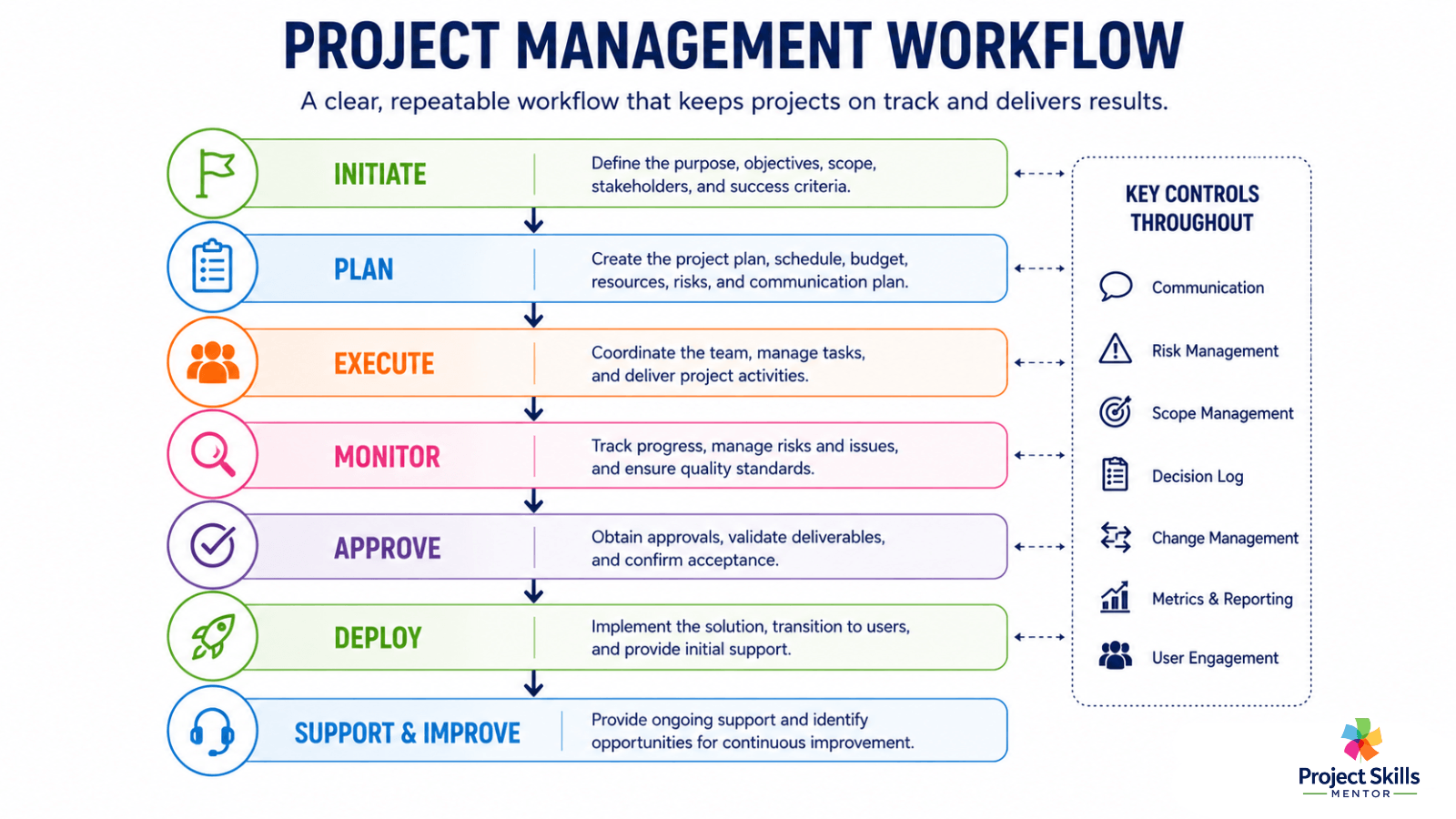
Successful projects don't depend on individuals remembering every detail.
They rely on repeatable systems that make the right way of working the easiest way of working.
One lesson I've learned from working on customer solution designs is that projects rarely fail due to a single major mistake.
They drift because of dozens of small assumptions.
A design decision isn't documented because everyone assumes it's obvious.
A resource dependency isn't discussed because the right person wasn't available during planning.
Acceptance criteria aren't agreed upon because everyone believes they already understand the deliverable.
Individually, these gaps seem minor.
Collectively, they create workflow bottlenecks, rework, delayed approvals, and uncertainty about what should happen next.
The team works harder to recover.
The client simply sees delays.
That's why repeatable workflows matter. They reduce reliance on memory, make expectations visible, and ensure important decisions are captured before they become expensive problems.
The following practices have consistently helped my projects remain predictable.
Create One Source of Truth
Every project should have one location for project plans, risks, decisions, meeting notes, documents, and actions.
If work isn't recorded there, it isn't part of the project.
Teams waste surprising amounts of time searching emails, chat messages, and personal notes for information that should already be available.
2. Write Tasks That Can't Be Misunderstood
Avoid assigning vague work.
Instead of:
Improve the customer dashboard.
Write:
Reduce dashboard load time to less than three seconds before User Acceptance Testing.
Define acceptance criteria for every significant deliverable.
One question I always encourage teams to ask is:
"How will we know this task is complete?"
If nobody can answer that question, the task probably isn't defined well enough.
3. Prioritize Using Risk and Business Value
Every week, ask two questions.
Which activities reduce project risk?
Which activities create the greatest value for the client?
I've seen well-planned schedules fail simply because a specialist wasn't available when the project reached a critical milestone.
Resource planning isn't just assigning people.
It confirms they'll actually be available when the project needs them.
4. Track Progress from Two Perspectives
Your project team needs detailed delivery information.
Your client doesn't.
Internally, track:
Not Started
In Progress
Blocked
Ready for Review
Complete
Clients usually want something much simpler.
Each week, tell them:
What has been completed
What's happening next
Decisions you need from them
Risks you're actively managing
That simple rhythm builds confidence because progress remains visible.
5. Build Feedback into Delivery
Don't wait until the project is nearly finished before asking for feedback.
Create review points after:
Discovery
Design
Prototype
Testing
Implementation
Another lesson I've learned is that client approvals become bottlenecks when nobody agrees on how quickly decisions need to be made.
A simple approval workflow with agreed-upon response times prevents teams from sitting idle while waiting for direction.
If feedback changes scope, assess its impact before work begins.
Clients appreciate transparency far more than surprises.
6. Communicate with Consistency
Good communication isn't about holding more meetings.
It's about creating predictable rhythms.
A simple communication schedule might include:
15-minute internal stand-ups three times each week
Weekly client progress meetings
Friday status summaries highlighting achievements, risks, decisions, and next week's priorities
Consistency reduces uncertainty.
Equip Your Team with Practical Project Tools
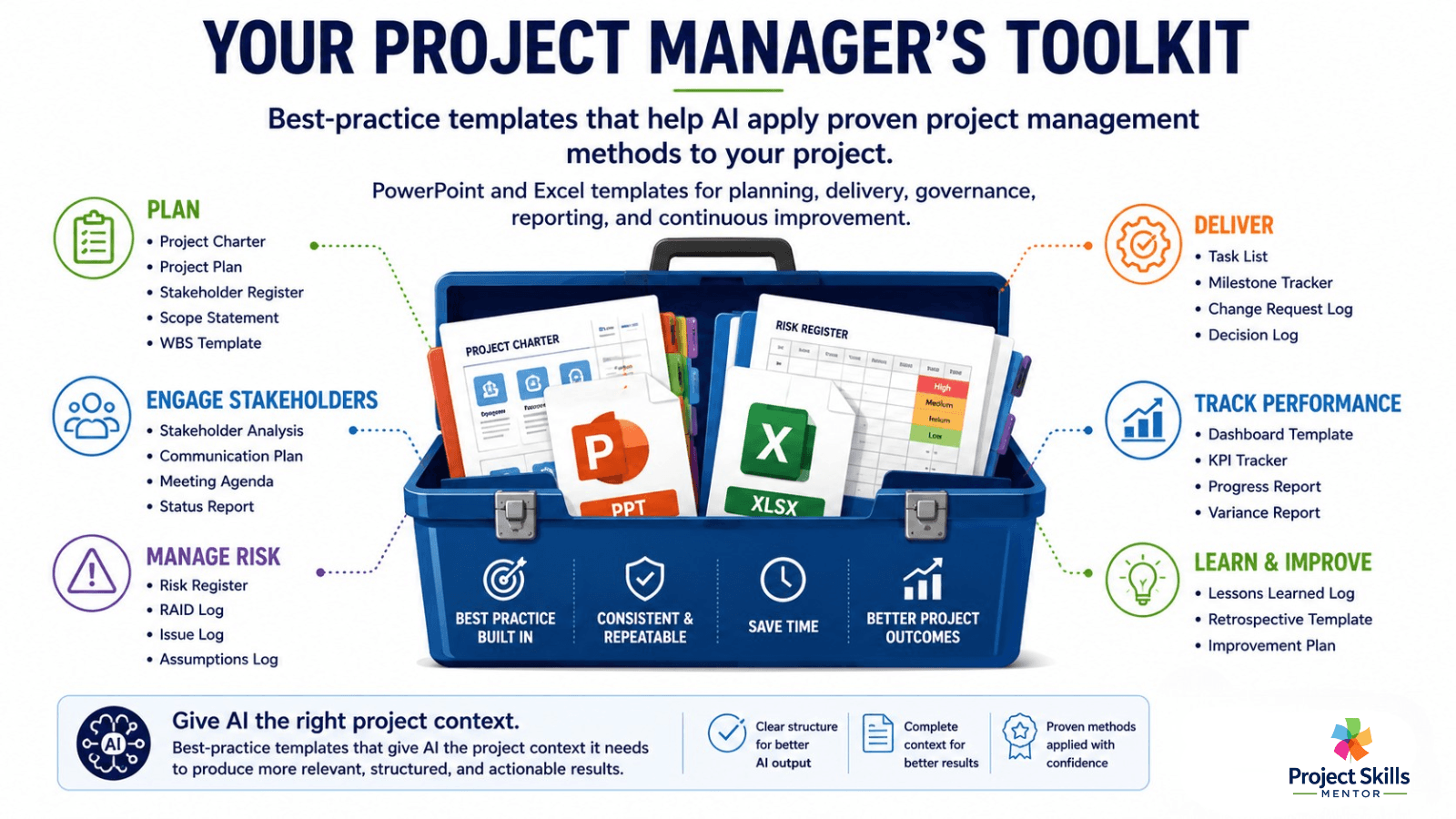
AI is only as good as the context you provide. The Project Manager's Toolkit gives your favorite AI assistant proven, best-practice templates that help generate fit-for-purpose project documents faster and with greater consistency.
Processes only work if they're easy to use.
That's why I recommend building a standard project management toolkit that supports every stage of the delivery process.
Typical templates include:
Project Charter
Stakeholder Register
RAID Log
Communication Plan
Change Request Log
Risk Register
Status Report
Lessons Learned Register
These aren't documents created to satisfy governance.
They're practical tools that help project managers spend less time creating documents and more time leading projects.
Project Skills Mentor Tip
If you're building your own delivery framework, my Project Manager's Toolkit includes templates you can adapt rather than starting from scratch each time.
Optimization Is a Habit, Not a Phase
The best project managers don't continually add new processes.
They continually remove friction.
Every improvement—be it a better workshop, clearer communication, stronger governance, an engaged User Group, or a more consistent approval process—makes the next project easier to deliver.
Projects finish. Optimization shouldn't.
Organizations that consistently deliver successful projects don't treat continuous improvement as another initiative.
They make it part of the way they work.
Start by improving one workflow this week.
Measure the results. Learn from the outcome. Then improve the next one.
Small improvements, repeated consistently, create stronger teams, happier clients, and solutions that continue to deliver value long after implementation.
Project Skills Mentor Tip
Develop your Journey Users and Mapping to ensure customer satisfaction using my Step-by-Step guide.